
Microsoft Office Word 2007 AutoHistory

One element that is missing in Microsoft's Office Word 2007 program is the ability to manage document revisions. The software program comes with revision tracking features but those do not help that much once the document has been saved and closed in Word 2007. Enter AutoHistory; A Microsoft Office Word 2007 add-in that adds document revisions to Microsoft Word.
It does so by automatically creating a copy of the document whenever it is saved either by the user or by the software. The functionality becomes available immediately after installation of the Word add-in. Checking the Show / Hide History box will display a sidebar menu with all document revisions of the active document. A double-click on any of the documents will load it in a new Microsoft Word window.
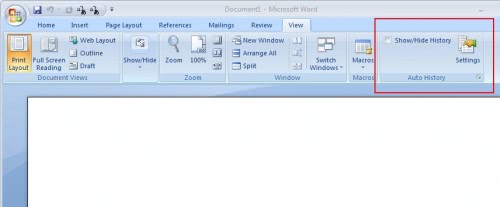
A click on the Settings button opens the configuration menu where the maximum number of document revisions and the language can be configured. The default number of document revisions is unlimited but can be changed if size is of importance to the user.
AutoHistory requires the installation of Microsoft Visual Studio Tools for the Microsoft Office system before it can be used and installed.
The Word add-in could come in handy for users who regularly work with Microsoft Word documents.
Update: The developer has updated the add-in for Microsoft Office which is now compatible with Office 2010 as well. Even better, the add-in now supports Excel as well as Word in Microsoft Office. This basically means that revisions will be saved now in both Microsoft Word and Excel in Office 2007 and Office 2010. All revisions can be restored and viewed directly in the supported applications.
The add-in for Office 2007 and 2010 offers an excellent way of maintaining a document history that you can go back to without having to actively make sure that different versions of documents are saved to the system.
Advertisement

















microsoffo word 2007
Great find Martin. Thank a Milj. Great app. Keep up the good work.