
Free Spyware Removal Tools

There are hundreds if not thousands of free spyware removal tools for the Windows operating system. The choice ranges from to popular spyware removal tools such as Windows Defender, Spybot Search And Destroy or Spyware Terminator to lesser known anti spyware programs and even so called rogue applications that look like spyware removal tools but are in fact malicious in nature.
This article will concentrate on two lesser known free spyware removal tools. The first program is called Roguefix. It has been designed to counter so called rogue applications. The tool has been specifically designed to remove rogue scanners, desktop and homepage hijackers, trojans, codecs and miscellaneous malware.
Roguefix comes as a simple batch file that has to be executed in Windows safe mode.
The tool will then scan the operating system for spyware and remove detected spyware automatically from the computer system. The free spyware cleaner is only compatible to the Windows XP operating system according to the software developer.
SmitfraudFix on the other hand can scan a Windows XP or Windows 2000 operating system directly. The user needs to boot into safe mode for the removal process though. The program will generate a report after the scan which will list all the malicious files found after the spyware scan.
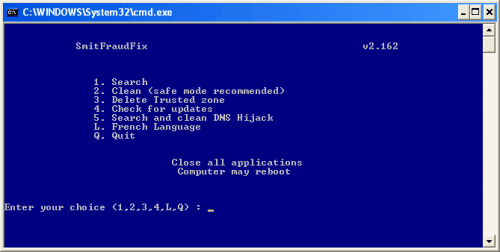
Both tools have been designed to detect and remove rogue applications only which does limit their usefulness in day to day spyware scans. It is however a good idea to have them at hand in case the computer system gets infected by rogue spyware.
Update: Roguefix has been discontinued, the developer site is no longer available. I suggest you take a look at Rogue Killer instead, a sophisticated program that can deal with many different rogue antivirus solutions that may have been installed on your system.
Advertisement



















Are you sure it works without installation becuase thats not what you get when you go to the link you provided and it’s a app you need to download and install.
We are both on thesame side but lets stick to facts please
Very nice application.Works Perfectly. Thanks for sharing.I found another free application which scans websites online.No installation is necessary.
http://techchand.org/555/prevent-malware-attack-with-free-qualysguard-malware-detection-scan
There are lots of spyware tools and many of them only detect specific virus. I am looking for one antispyware that will clean my documents.
These small portable tools wud definitely help some times or the other. For me it had….
Browse in a Sandbox, scan ALL programs at sites like VirusTotal or Filterbit and load up a UBCD4Win boot dish every 2-3 months just to be sure. It’s more about good habits rather than good anti malware.
I’ll check these 2 out in a VM… Thanks!
I agree with Pietzki, alot of people see ‘freeware’ and just download the software, not understanding the full implication.
You need a comprehensive software programme with continious updates
I agree with Saurabh, these programs are specialized tools that are not meant for everyday use by the average user. I think they shouldn’t be posted here; the average user will see “free antispyware program” and just download them and try to use them. There’s a reason that most proper pc help forums warn users not to use these without expert guidance…
@spywareblocker: I think you missed the point…
Zone Alarm Pro Firwall’s anti-spyware module is blocking:
http://siri.urz.free.fr/Fix/SmitfraudFix_En.php
although it has a clean WOT rating. It might be that Zone Alarm blocks anything with Smitfraud in the url.
They even recommend the above site here in this Zone Alarm forum post!:
http://forums.zonelabs.com/zonelabs/board/message?board.id=MalwareDiscussion&message.id=1210
I think it may be time to uninstall Zone Alarm Pro.
I don’t think you can count a rogue spyware installation program as a free spyware remover. I think that would be called a free spyware installer. And I do believe that there are thousands upon thousands of them out there. (free spyware installation is not hard to come by) By some estimates, 1 in 10 websites has some type of spyware/adware/malware that will be installed on your computer if you don’ protect yourself with a good spyware blocker as well as an antivirus and firewall software. The triple protection system. Even if you use the free applications, at least use something, it’s better than nothing. In addition to a spyware remover, consider a spyware blocker, to keep spyware off BEFORE it gets on your computer.
These tools are not really meant for day-to-day use. Malwarebytes anti-malware and Superantispyware are good free anti-spyware tools.