
Windows Defender

Windows Defender is a Microsoft security software product that is included in the Windows Vista and Windows 7 operating system. It is also available as an option download for the Windows XP system. The program is a anti-spyware program that can scan a computer system for malicious software and delete or quarantine the findings.
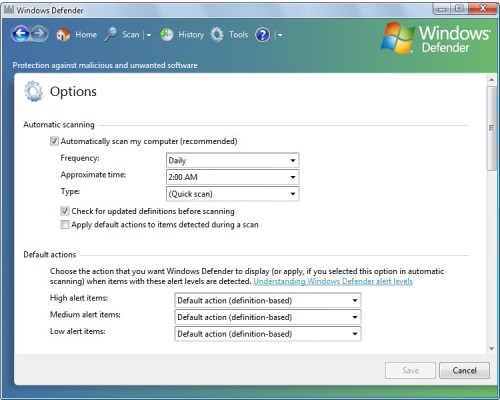
Windows Defender comes with the usual options to automatically update the program and schedule regular system scans to protect the computer system. Default actions for low, medium and high alerts can be defined that will be executed by the anti-spyware program automatically.
Microsoft's anti-spyware solution comes with the interesting advanced tool Software Explorer which can display extensive information about startup programs, currently running programs, network connected programs and Winsock service providers.
Each program and provider is sorted by company which makes it easier to find non-Microsoft programs that are running or connected to the computer system.
Microsoft has improved Windows Defender over the years. The company did receive lots of criticism in the beginning which can be attributed to a low spyware detection rate. Several anti-spyware products have performed better in tests, outlined here or here. Please note that the tests linked in this article have been performed about 10 months ago and that the situation may have changed in the mean time.
Which leads to the question: Are you running anti-spyware software? If so which?
Update: It seemed for a long time as if Microsoft Security Essentials would replace Windows Defender in the long run, but that apparently was not the case. Microsoft made the decision to integrate the capabilities of Security Essentials into Windows Defender on Windows 8. The program basically combines the capabilities of Microsoft Security Essentials and Windows Defender in one program. That's also the reason why Security Essentials is not available for Windows 8.
Advertisement















Despite the above comments on Microsoft’s Windows Defender, I will be using it on my PC mainly because it is FREE.
Microsoft’s Windows Defender is not better, but I like it and I’m sure it protects my PC very well since I never had a single problem.
I think this is marketing step of antivirus software vendors to decrease popularity of others similar products.
This article may be long dead, but I thought I would add my .02 cents. I personally use a combination of the following – Avast!, Malwarebyte’s Anti-Malware, and Superantispyware. I use Avast! for real-time protection. There are many choices out there that are good (Kapersky and F-Secure are good paid products), but I picked one that is free (Avira is another good choice for free). I then use Malwarebytes and Superantispyware as independent scans that I do on a monthly basis. I have actually worked in many different corporate environments, but using Malwarebytes and Superantispyware to remove an already infected computer has given me a very good success result. I believe that using combinations of many different products provides the best results. So Windows Defender isn’t the best product out there, but used in combination with the above three programs I have had very good results. Just my opinion.
I prefer Kaspersky.
it is imp
Not a Windows Defender fan.
I use 360 and Avast.Not sure if that is sufficient enough.Thinking about getting Kaspersky.
i would like windows defender
In my opinion, the best spyware is avast. It works perfect on my pc.
i don’t use any specific antispyware, currently running avast home for protection.
arapça çeviri
Many antivirus software if have anti-spyware module is alerting to switch off windows defender. This to me is very strange, because I always wanna to increase more the security of my PC. I think this is marketing step of antivirus software vendors to decrease popularity of others similar products.
i was never really a fan of defender and this makes me glad that i dont use defender
I got a bad virise called quick defender if I go on the web I see sites that tell how to get rid of it but I dont know if I can trust them I have malwareby anti malware and windows defender I ran both but they wount get rid of it any suggestions I dont know much about computers I am only 11 can you help thanks
patants on their software. You can’t get it free unless they give it to you free (and in that case, you might guess there are probably strings attached. But, hey, it’s free. What did you expect?)
thanks
Okay, I’m not an expert in this field, but … I’ve got Windows Defender (‘cos it was free, natch) and McAfee (came with the broadband package, so also effectively free). They both run on this old XP, which struggles with McAfee because it only has 512Mb of memory. McAfee is a resource-hungry suite of programs; Defender seems to be far more compact – yes, I know it covers a more limited range of functions, but I get the impression that the McAfee code is careless in its freeing of memory.
The main difference seems to be that Defender scans mainly Windows-related programs, processes, and files, and checks their registry settings for problems. If you have 3rd-party software which isn’t running, Defender seems to ignore it. It will detect, I guess, any malware problems which have affected those parts of the system that Microsoft considers to be important. That’s fine, no problem there. McAfee AV is either more thorough or a whole lot less efficient, because its full scan takes about twice as long as Defender’s on my machine. However, McAfee certainly detected and removed the Conficker worm that came back on a USB memory stick that I had been using to save files when working at the local library (hint : clusters like these may not be running AV software on their machines, they rely on a clean re-installation at the start of the day. After that you’re at the mercy of whoever used the PC before you).
So the question of either/or may not be the right question to ask : perhaps it ought to be, with which other AV software is Defender compatible? Do they interact with each other in ways which degrade your machine’s performance?
And, to pick up on a comment made earlier in this thread : what’s wrong with Microsoft packages? I trust the source, and Microsoft is usually very quick to release fixes for known problems – unlike (if their user forums are anything to go by) McAfee. I’m not sure I quite trust Microsoft’s policy of gathering data about your platform, installed software, software usage and so forth, but I put that down to corporate paranoia and jealousy over intellectual property rights and patants on their software. You can’t get it free unless they give it to you free (and in that case, you might guess there are probably strings attached. But, hey, it’s free. What did you expect?)
McAfee is probably not the best choice when it comes to protecting a system. Far better choices are available, take a look here https://www.ghacks.net/2010/08/20/the-2010-anti-virus-league-tables-are-out/
I dont like defender. I live Kaspersky. My best protection software.
Despite the above comments on Microsoft’s Windows Defender, I will be using it on my PC mainly because it is FREE.
i would like windows defender
My mama told me: “Check with professionals at http://www.av-comparatives.org/
and don’t you t listen to or read any marketing spiel.”
I run Spyware Terminator for some time, but than stopped to use it.
The first rule of security for me is “Use as less MS programs as you can“.
Don’t use IE.
Don’t use Outlook
Use independent firewall instead of built-in.
Try to don’t use MS Office (use OpenOffice where you can).
My anti-malware bundle is:
Comodo Internet Secutity
Clamwin
Winpatrol
{and various other tools, but I use them rarely}
It is not very good protection, – but as I do not behave in risky way, my chances to catch some malware is low anyway..
Only two cases it 9 years – one of them was some harmless trojan, brought in by my wife, and other was the famous Windows network worm (and I could blocked it with firewall but made mistake allowing access for intranet address of my colleague).
I know that windows defender is not very popular, but still I like it and use this program for more then one year, and I’m sure it protects my PC very well since I never had a single problem. I’m also sure Windows Defender is disliked mostly just because it comes from Microsoft, but I don’t share that point of view since Microsoft is also able to create a decent free program.
I’ve removed Windows Defender from all my units. Microsoft now has a habit of changing Defender’s signatures so that any firewall other than Windows Firewall will list each update of Defender as a different program requesting access to the web. Soon, the firewalls’ list of allowable programs mushrooms into 30+ Windows Defenders entries.