
Set Static IP Address on Windows

Simple Static IP is a free program for Microsoft Windows devices that allows you to set a static IP address and related information.
Windows computer systems ship without static IP addresses assigned to them usually. While that is fine most of them, there may be times where you need to set a static IP address on a Windows machine.
Doing so has several advantages, and it may sometimes be required to connect to a particular network.
It is for instance important if the computer is connected to a router where port forwarding is configured. There are other benefits which are not part of this article. Experienced computer users know how to set static IP addresses for their network adapters. It might take them a minute or two but usually not longer than that.
Turning it on and off on demand is however not as comfortable, as you have to add or remove information from the network adapter whenever you need to do so.
Simple Static IP
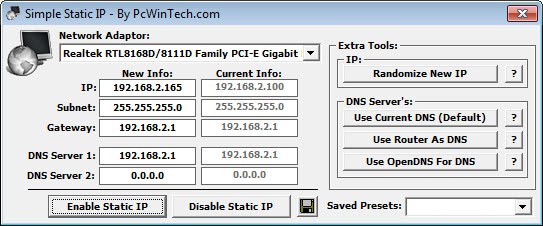
The main use of Simple Static IP is that it provides you with options to set and disable static IP addresses on Windows. The program may help inexperienced computer users furthermore make those changes without having to dive deep into the network adapter configuration on Windows.
Using Simple Static IP, it takes just a couple of mouse clicks and the entering of IP information to do so.
To add a static IP address to your PC, select one of the network adapters from the menu if you have installed more than one. This step is only necessary in this case, as one network adapter is always selected automatically. The program displays the current settings right in its interface which you can check. The information displayed there includes the assigned IP address, the subnet, gateway and both DNS servers.
The values on the left under New Info highlight the values that you can enable with a click on Enable Static IP, the values on the right are re-enabled when you select Disable Static IP instead. You can click on all new info fields to change the values, for instance the static IP or DNS servers.
The extra tools provide you with a couple of features that may come in handy. You can click on the randomize new ip button to add a random IP to the new info pane for instance. There are also three tools to set custom DNS servers.
You can click on the button to use the current DNS which is also the default option, use the router as DNS instead which only makes sense if the values differ, or assign OpenDNS servers instead.
Lastly, you may also save presets, and load them again at a later point in time. This is useful, as it allows you to configure IP configurations for different networks, e.g. a home and work environment.
Simple Static IP is compatible with all recent versions of the Microsoft Windows operating system.
Verdict
Simple Static IP is a handy program for Microsoft Windows devices to assign different IP related values to a network adapter. The ability to save these configurations is handy if you have to switch between several regularly.






















thanx maan soo much!!! :*
This setup file, when cached by my sync software and dropped on my XP machine, was flagged as a false positive by my virus scanner, which said it had the signature of Possible_Movly-1. I’m not saying it’s dirty; I’m saying it caused a false positive and am doing so just in case someone else gets that problem.
ipswitch easy to use
I have a couple of questions
portable or not?
can i return to dynamic ip status after i close it?
and
Ghacks is my favorite blog ;)
It comes with an installer, have not tested it if you can simple execute the exe without installation. It comes with a button to return to the previous state. Thanks for the compliment ;)