
Convert PDF To Word or Excel

You may want to extract data from PDF documents sometimes, for instance images that are embedded in a document to use them in another document or for another purpose.
While most PDF readers are nowadays capable of copying text from PDF documents, they usually do lack the ability to copy more complex data like tables or drawings from those documents.
Enter PDF to Excel and PDF to Word, two online services created by the same developer that can convert PDF documents to Microsoft Word or Microsoft Excel documents.
Both products are available online only and simple to use. Three steps are required to convert the PDF document. You need to select a PDF document from the local computer first, pick the desired output format, and enter an email address where a notification email is sent to when the conversion is finished so that you can download the resulting document.
Convert PDF To Word or Excel

The test results that I got out of this have been impressive. Take a look at the screenshot of the first page of a PDF document and its Word conversion.
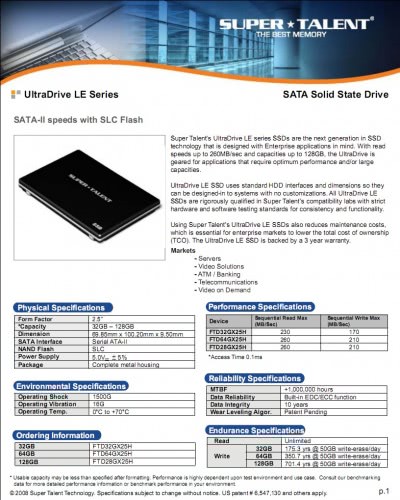
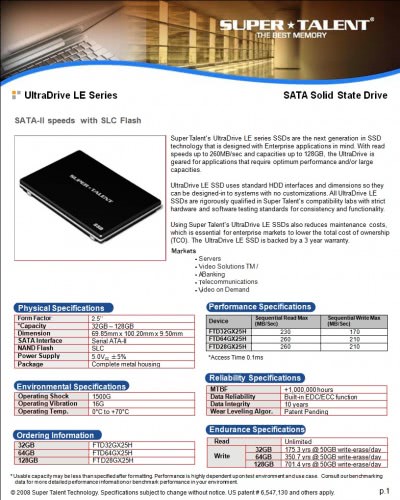
The conversion comes close to the original. Some parts may need some fine tuning but the overall look and feel of the PDF document is usually well replicated in the Word or Excel document.
You should not expect a 1:1 copy of the original document, but the output is definitely easier to work with than the PDF document.
Probably more important than that the data in the tables looks exactly like that of the pdf document, with the difference that it is fully editable in the Word or Excel document that gets created.
PDF to Excel (link) and PDF to Word (link) are two helpful online services for users who have to convert PDF documents into Word or Excel format.
Both services belong to the company that is making the PDF reader Nitro PDF. Please note that the resulting documents are either doc or xls and not the newer formats xlsx or docx.
One caveat to the method is that you need to upload the document to a third-party server. While that may not be a problem all the time, you may not want to do so for financial documents or other sensitive documents.
The other issue is that you need to supply an email address. I recommend you use a temporary email service for that, for instance yopmail.
If you prefer a local solution, try the free pdf to word converter that you can download from the linked resource. It only supports PDF to Word unfortunately and not Excel as well, so keep that in mind.


















another cool online tool to convert pdf to docx.
http://pdfaid.com/pdf-to-docx.aspx
Disclaimer: I am associated with the development of this website.
you can also try Tweak pdf to word.
it is cheap but performs very well.
and it also allows us to convert a lot files at the same time.
you can try it in http://www.tweakpdf.com
Anyone got concerns about the fact that you’re sending information to a third party? Would you use this service for work documents, or anything with bank details, social security details on it?
Just curious.
Dave. I personally would not upload any document or file to the Internet that contains information about myself, business, family or friends.
I’ve tried to convert a small PDF document (150 KBytes) using PDFtoWord service. It works like a charm. The result was in my mailbox after 3 minutes. Also It understands Cyrillic in file names and contents perfectly. Thanks, Martin, for useful post!
Unfortunately, this doesn’t seem to do any OCR.
I scanned a seven page document that consisted of just text and a table using the scan to pdf feature on our copy machine and sent it in to be converted to Word. I got back a word document that consisted of seven pictures of my text.
Well that is strange as my document consisted mostly of text with the exception of a few letters in the middle (the markets part). Everything else was copyable. I suspect they try to OCR and if that fails they create pictures of the contents that was not identified.
OK. I tried it and got the converted pdf in like 5 minutes. The result was absolutely fantastic and way better than anything i have tried before.
Also the design of the website is extremely easy on the eyes.
Looks like a winner to me.
Thanks, I can certainly use something like this.