
5 Essential Firefox Extensions

One of the best and most popular features of the Firefox web browser is the browser's extension support.
Extensions are additions to the web browser that add new features and options to it.
Tip: We maintain a large list of the best Firefox add-ons on our site. It features well over a hundred add-ons for all kinds of activities and benefits.
The 5 essential Firefox extensions that this article covers are essential to my Firefox setup. It should be clear that this is a personal selection and that you may have different requirements depending on how you use the browser.
Most users will probably come up with a different set of Firefox extensions that they call essential based on their web browser usage.
1. Last Pass
Probably the top Firefox extension that I do not want to live without anymore. It is a password manager that stores the encrypted data on the Last Pass server network.
It comes with a password generator, auto-login and auto-fill opportunities, a form filler, secure note taking and one time passwords that can be used to access the stored passwords once when connecting from insecure systems.
It supports two-factor authentication and other security features to hack-proof the account, and is also available for other web browsers.
Last Pass comes not only as a Firefox extension but also for Microsoft's Internet Explorer and Google Chrome, as a pocket installation to be put on USB sticks and for mobile devices and browsers.
The developers have created a bookmarklet as well that can be used to access the passwords from other web browsers as well.
2. NoScript

Second in line is the security extension NoScript which disables all scripts on most websites by default.
Scripts, for example JavaScript or Flash, are one of the most prominent ways of attacking a computer system.
This is the essential security extension for the Firefox web browser.
Scripts can be activated manually after a website has been loaded or automatically by using whitelists in the software. The extension contains lots of settings and options to tinker with, and features additional security features such as click-jacking protection.
3. Greasemonkey

Greasemonkey is an extension that allows users to change various aspects of websites by loading scripts that do that.
The scripts are usually powered by JavaScript and can for example change the design of websites by adding or removing elements.
It can also be used to add new functionality to a website, e.g. adding options to YouTube directly for a better experience. Thousands of so called userscripts can be accessed at general repositories of userscripts. It offers scripts for many popular websites and services.
4. Snap Links Plus

Snap Links Plus is a very handy add-on for a specific purpose. It allows to draw a rectangle on the screen using the right-mouse button by default to open all major links found in that rectangle in new tabs.
This is for example very useful on forums where a lot of threads can be opened easily using that add-on. It shines when it comes to link lists of any kind. I personally use it to open a full page of forum threads at once without having to click a dozen times to do so.
5. Tiny Menu
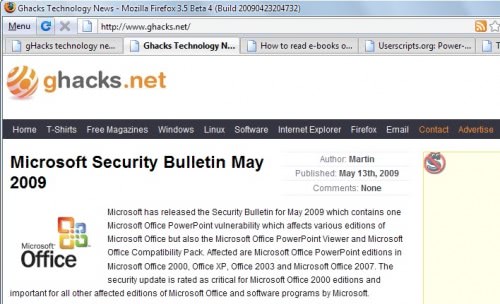
Update: Tiny Menu is no longer compatible with recent versions of the Firefox web browser.
I like the Firefox menu to be as tiny and optimized as possible. Tiny menu helps by compressing the file menu into one menu item that fits perfectly into the Firefox toolbar.
Lets start the discussion. I know that you will suggest different add-ons and I'm eager to listen.



















I used to love Tinymenu but after installing Hidemenubar , I uninstalled Tinymenu =D
The 5 most useful for me are:
Adblock – because I can’t bear ads except plaintext side ads like Google’s (i use Remove It Permanently too, but AdBlock provides most adkills).
FoxGestures – because I like mouse gestures
FoxyProxy – because I use HTTP filtering proxy and caching proxy, and need to set rules to load particular sites via particular proxies.
Tabmix Plus –
FEBE – it’s backups saved my days two times.
Flashgot – downloading master
DownloadHelper – often I grab video.
I can name many more, but these are the most essential for me.
Ubiquity is essential for me. Its so great that it is the one addon that brought me back to Firefox from Chrome.
Can not live without the addon
Web Search Pro!
Allows you to mark text on a page, drag and drop it on a variety of (fully customizable) search engines in form of multiple squares that blend in over your window. It just makes my search behaviour way more faster.
I use all these.
Adblock
flashgot
downloadhelper
chinese pera-kun
flagfox
foxtab
greasemonkey
linkification
skipscreen (great for rapidshare/megaupload wait skips)
stylish
xmark (foxmark before)
ultrasurf addon (proxy)
All for a complete browser experience.
G’day Martin, AdBlock, Mouse Gestures and DragToGo are my top 3. Been testing out TreeStyleTabs and WOT too – both impressive.
Cheers, Thomas
I would not use noScripts at all especially as they whitelist there own adverts and screw around with adblock plus also.
http://adblockplus.org/blog/attention-noscript-users
http://hackademix.net/2009/05/04/dear-adblock-plus-and-noscript-users-dear-mozilla-community/
the bookamrk scripts from pornzilla (like the redirector one mentioned above)
garbanzo, if you like quickdrag you’ll love easy dragtogo. much better.
extensions for more screen real estate: hide favicons, faviconize tabs, hide caption
constantly used and seldom seen mentioned: informenter, fayt, taboo, scrapbook
Google toolbar; winamp toolbar; Footiefox; Adblock Plus; Greasemonkey; Orkut toolbar; mc afee site advisor! These are the addons that I use.
1. QuickDrag: i learned about here. the first extension i install.
2. All-in-One Sidebar: an Opera-style sidebar that captures major FF dialog boxes.
3. BBCodeXtra: a must for frequent forum posters
4: KeyScrambler: security against keyloggers and other nasties
5. Redirect Remover: simple and effective
I tend to not recommend NoScript because of the way a majority of people use it. Instead of whitelisting only selected sites people tend to blindly whitelist websites simply to get them to work. That does little when a site has bad code running on it, you whitelist the site, the code executes for you. NoScript is nice in principle but the amount of javascript used on sites today make it more annoying than good for most people out there.
adblock plus?
Since most ads are run by scripts NoScript takes good care of that.
Firebug. I treat Firefox as “that thing I need for Firebug and YSlow” mostly. :)
Judging by the email address in the LastPass screenshot, it looks like it probably came from their website.
My favorite extensions that I can’t live without:
~ CustomizeGoogle
~ Remove It Permanently
~ AdBlock Plus
Interesting list. I like how the first entry in your Firefox extension list has a Google Chrome screen shot!
Well I did not want to show a screenshot of my sites and passwords and the only screenshot of that interface on their site was in Google Chrome ;)
If you use Firefox you may want to try TweetFox, the twitter add-on for Firefox that helps you post quotes from the websites you visit to your twitter account http://tweetfox.cloudberrylab.com/ IE plug-in is also available.