
Create your own file extension icons

Air Icon Generator is a free Adobe Air application that you may use to create icons in different output sizes quickly and without extra costs.
I absolutely love all kinds of icons, and not long ago I found a very quick way to make my own simple Adobe-Suite-like icons.
All you need is Adobe Air, and an app called Air Icon Generator. The app is from the same people who gave us Bookmarked Generator, and works with the same style, although with quite a bit more efficiency. You can churn out 4 different sized icons for as many formats as you want, I created about 10 in 2 minutes.
Air Icon Generator
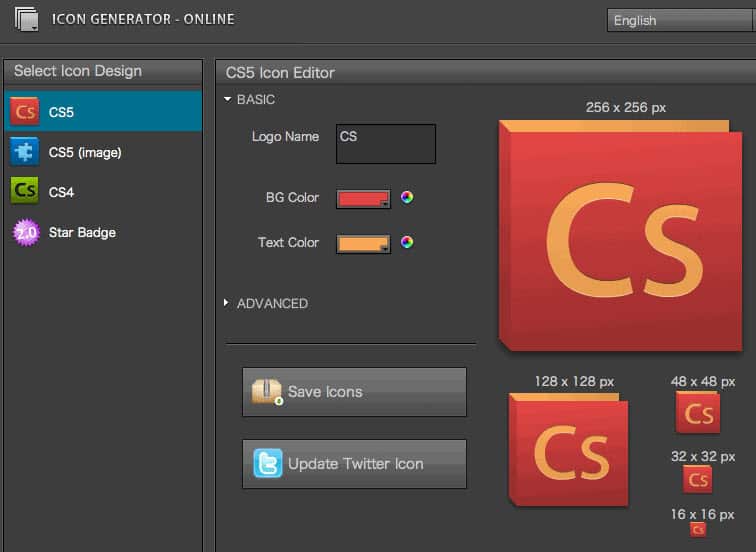
All you need to do, is fire up the application, select your style (Adobe style, or Web 2.0 star style), enter your text, up to four letters, select a background color and click generate. The shading is done extremely well, no matter what color you choose your icon will look good. This really is a great way to create file extension icons, especially if you use a lot like php, css, js and so on, you can get much better stuff the the original system ones.
The only thing I don't like about the app is how it saves icons, more specifically, the naming. It generates four files with the names of "icon_16.png" for example, where "icon" is NOT the name you entered. This way, if you want to save a new icon, you need to get the old ones out of the way because they will be overwritten. I have no idea why the icons are not named after the name you enter, this would make saving and handling of these files much easier. Otherwise a great little app, give it a go!
Update: The site appears to have changed as you are now taken to a web application where you can create your icons. Adobe Air is no longer needed to create icons which may be a relieve to many who do not want to install the software on their system just for the opportunity to use the icon creator.
Another benefit of the online creator is that all different icon versions are downloaded as a single zip file. While you will still run into naming issues here if you create multiple icons as the name is not changed, it is much better than having to deal with multiple individual items.
Please note that the Adobe Air version is still available on the website as well. If you prefer it, you can still download it to your local system and run it from there.


















‘Your’ own file extension icons, you need to add an r.