
Quote, research and take notes with Quotepad

Quotepad is a free program for Microsoft Windows that enables you to quickly jot down notes and manage notes created previously.
I sometimes run into an application that's not hugely new, but it has such great handling, ease of use and functionality that I start to really like it. One such discovery today is Quotepad. Officially it's positioned more like a copy-paste clipboard tool, but it is much more, offering checklists, reminders, timestamping and more.
You can use a simple key to add a quick note, just select any text and press ctr+shift+q. Your note will be instantly created, which you can then edit, add a subject to and save. This is not so new, a lot of apps offer this functionality, but the little things that Quotepad offers add a lot of extra to the program.
Quotepad
Just as an example, clicking the taskbar icon brings up a note list. Clicking it again (or double clicking) brings up the interface to add a new note. Simple, but very effective and efficient use interface. You can mark notes, have the whole window stay on top, change color schemes, change reading order, use filters to narrow your notes, Quotepad can become a great research tool, not just a copy-paste companion!
I find it very useful when I'm thinking about post ideas. Even with tools like Google Reader, it is sometimes hard to keep track of what I want to write about, and a quick copy paste into Quotepad is a big help, firstly because I can paste the intro paragraph from a blog post, or a description from the app main page.
Quotepad shows the source of the text, so I can save the url copy-pasting time. I can then narrow by keyword, making all my blogging work much easier and faster.
Update: The most recent version of Quotepad ships with additional features that you may find useful. You can now add reminders to the application. If you do, you can configure it to remind you once or regularly either by playing a sound or running a program on the system.
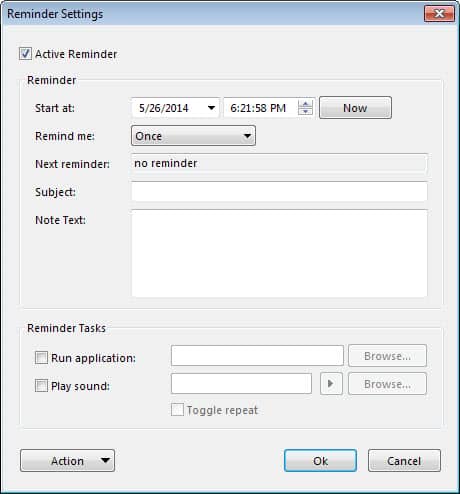
The most recent version of Quotepad is currently not available on the developer site anymore, a download returns a 404 not found error. We have uploaded the latest Quotepad version to our own server from where you can download it. Just click on the following link to do so: (Download Removed)
Please note that we do not support the application in any way.





















Bah, it gives me an access violation when I try to copy text from Opera@USB. Will try CintaNotes instead..
Really like citanotes.com, much handy and useful.
Was going to post this looks a bit too much like CintaNotes like mentioned above. I prefer CintaNotes as well.
try CintaNotes if you want something with more features, such as tagging. it’s smaller, and also portable.
http://cintanotes.com/
Looks very much like ‘NotesHolder’ but smarter, more stable and more elegant. This is s keep :)
Thanks a lot Daniel (with the lion hart) great tip i realy like it this app its ferry different from EditPad Lite.