
Firefox Auto Bookmark

The default way of creating bookmarks in Firefox is to either click on the white star in the address bar (or next to it as is the case in Firefox 29 or newer) or with the shortcut Ctrl-D to open the page bookmarked dialog.
Update: Firefox comes with a built-in option to bookmark all tabs. Simply right-click on a tab in the web browser and select the "bookmark all tabs" context menu option to do so. An add-on is no longer required for this.
Inexperienced users may also use the bookmarks menu in the main toolbar instead to bookmark the current page in Firefox.
There are however situations where this technique becomes highly time consuming. Think of research conducted on the Internet with dozens of open websites in tabs in the web browser.
Bookmarking those in Firefox would mean to click on each tab to bookmark the websites. A better way is to automatically bookmark pages in Firefox and this is where the Auto Bookmark All Tabs extension for Firefox comes into play.
The extension has been designed to automatically bookmark all open tabs on exit or during a session (either by pressing a button or the shortcut [Ctrl Shift A]) which is very handy for researchers and basically anyone who works with boatloads of tabs that need to be saved as bookmarks at one point.
The Firefox bookmarks extension comes with a few options that are worth looking at after installation:
- Auto bookmark Firefox tabs when Firefox exits
- Add new bookmark folder automatically that displays date and time of saving
- Bookmark to unsorted bookmarks.
- Select a specific folder for storing those bookmarks in Firefox.
Update - The auto bookmark extension is no longer available. Bookmark Current Tab Set is an alternative that is compatible with recent Firefox versions. It offers a similar functionality.
Adds options to bookmark all tabs in a window (optionally without opening a dialog) and store them in a new bookmark folder that is given the current date (and optionally the time) as its name.
To use the add-on do the following. Press Alt to bring up the menu bar in Firefox. Select Bookmarks > Bookmark Current Tab Set to save all open tabs as bookmarks in Firefox.
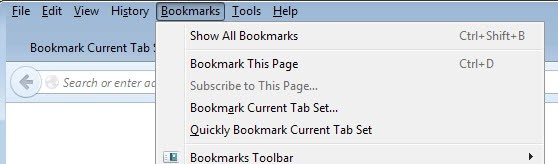
The sets are saved as bookmark folders which means that you can open them all again in the browser at any point in time.
The extension is useful, not only for research but also if you work with sets of websites regularly. Just save each set once in the browser to open it again at any time in a new browser window or the current one.



















Thanks for this! Sometimes I have to close FF down because it’s consuming so much resources and don’t want to have to wait for all 3-4 windows with 30+ tabs each to reload. Pressing Ctrl+shift+D for each window is tedious and time-consuming.
I really wish Chrome would start getting all the addons I love from FF or that FF would address resource management the way Chrome does. Although Chrome uses more memory on my system, it uses less CPU and doesn’t slow my system down a all, whereas FF makes it so the cursor lags behind when I’m typing -_-
Thank you for this! I’ve been waiting for a plugin like this for firefox 3. OpenBook used to do this functionality in ff2, but it no longer functions properly in ff3. I installed the plugin, but I can’t seem to get it working. Did it work out of the box for you?
I don’t bother with Firefox bookmarks. I use the FF add-on Plain Old Favorites ( https://addons.mozilla.org/en-US/firefox/addon/668 ) which gives me the same favorites whether in FF or IE.
wow, thanks, just what i needed. another complicated, obtuse, redundant addon to make
my life more conveniently micro seconds faster. doesn’t firefox already do this well enough?
don’t developers have better ideas than more of the same old stuff? what exactly does this do that Fx doesn’t already do?
Well first of all you do not need to install it if you do not need it. Easy, eh. I always find it fascinating how some users think their “needs” are everyone’s needs.
There is another way to bookmark all tabs that are open that I have been using for a while. One way is to just right click on one of the open tabs and select “Bookmark All Tabs…”. Or press “Bookmarks” in the title bar “Bookmark All Tabs…”. Each way you can create a new folder for all your bookmarks. Works every time and no need to add another extension.