
Move Thunderbird Email Profiles To Another Location

The email client Mozilla Thunderbird uses a similar structure for storing data as the Firefox web browser. It uses profiles directories that are saved by default to the Thunderbird folder of the user directory of the operating system.
There are some reasons why some users may want to move the data from the Thunderbird folder to another custom folder.
Some that instantly come to mind are running out of storage on the primary hard drive which you could resolve by moving the profile folder to a different partition or hard drive. And if you like security, you could move it to an encrypted folder or an encrypted hard drive instead to protect email access.
Whatever it may be it turns out to be very, very easy to move a single profile or even all profiles from the default location to another one.
Recent versions of Thunderbird make it even easier. Here is what you need to do:
- Locate the Thunderbird profile folder that you want to move to another location or computer. The easiest way to do that is to open Thunderbird, select Help > Troubleshooting Information, and click on the open folder button on the page that opens. If you don't see the menu bar tap on the Alt-key to display it.
- Copy the entire profile folder including the root folder to the new location or a USB drive.
- Paste the profile folder to the new location, e.g., another drive on the same computer or a new computer.
- Start Thunderbird with the -p parameter to open the Profile Manager. Find the Thunderbird shortcut, right-click on it and select Properties. Add -p to the target field if you are on Windows. This opens the profile manager.
- Select Create Profile from the menu. Enter a name for the profile and select the "choose folder" button. Navigate to the profile folder and click on it so that its files and folders are displayed. Click the select folder and then finish.
Thunderbird should now display all emails and accounts of the profile when you run it (using the profile manager). If it is the only profile, remove the -p parameter from startup again to speed up the start.
Move Thunderbird email profiles
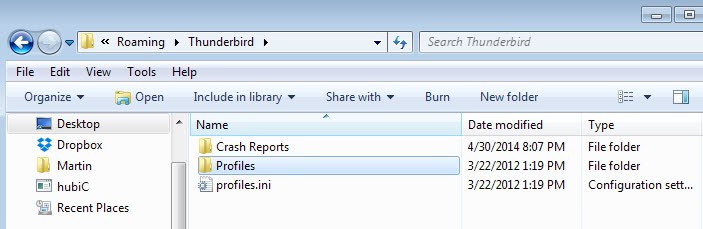
The first step is to close the Thunderbird email client so that it will not write data to the profile folder anymore. The default location of the Thunderbird profile folder depends on the operating system in use, below is a list of common locations:
- Windows XP/2000, Vista, 7, 8 and 10, %AppData%\Thunderbird
- Windows 95/98/Me, WINDOWS\Application Data\Thunderbird
- Linux, ~/.thunderbird/
- Mac OS X, ~/Library/Application Support/Thunderbird/
Copy one or several of the Thunderbird profiles to the new location. Now open up the file profiles.ini in the original folder and edit the path pointing to the new profile folder locations accordingly.

You also need to change the parameter IsRelative=1 to IsRelative=0. What this does is change the path value that Thunderbird accepts for profile links from the relative format to full format. So, instead of something like Profiles/xyu.default, you have to point to the full path, e.g., c:\profiles\xyu.default instead.
Please note that this is valid for all profiles which means that you need to add the full path (e.g., c:\thunderbird\profiles\profile.code\ in the Windows operating system) to profiles that are kept in the default location. Start the Thunderbird, email client. If everything worked well, it should display the emails and other data as usual for the profile.
If that did not work, retrace the steps and make sure you have set the correct new profile directory in the profiles.ini file listed in the user folder.
There is a second option that you can make use of. Instead of editing the profiles.ini file, you can also create a symbolic link between the new location of the profile and the old. You can use a program like Symbolic Link Creator for that.






















This seems to be a little out of date.
In Thunderbird 78.10.2:
* Open Thunderbird -> Help -> Troubleshoot Information -> about:profiles
* Create a new profile where you want it (inside AppData is a bad idea, IMHO). The name is partly fixed, and is marked as the “current profile”.
* Menu (three bars, to the right) ->
* Menu -> File -> Offline -> Work offline, Later
* Close Thunderbird
* delete the folder with the new profile with windows.
* move the original profile to the folder where the new profile was, and rename it to exactly the name the folder of the new profile had.
* start Tunderbird, it should now use the profile at the new location.
“Start Thunderbird with the -p parameter to open the Profile Manager. Find the Thunderbird shortcut, right-click on it and select Properties. Add -p to the target field if you are on Windows. This opens the profile manager.”
None of this makes any sense. where do I find the Target field I have tried adding the -p all over the place and it just does not work please do explain this in layman terms or using images Thanks
I have new laptop – I recovered all my files from Carbonite backup. I have tried to follow these instructions but it does not work. Why is this so hard, so many steps?
It won’t let me pick the folder the profile is in. What name of profile should I use?
Hey. I’m on a MAC and desperate to get my 24 GB profile on an external drive. I can only follow the instructions to the point of copying the Profile folder to the external drive, everything else means nothing to me. And when I follow this path:
Mac OS X, ~/Library/Application Support/Thunderbird/
There is no Thunderbird in the Application Support folder
Any help hugely appreciated.
Well it worked like a charm for me with Windows 10. I moved the profiles folder from the small but fast C: drive to D: with an empty Thunderbird folder as its root folder (I figured that is what was meant by root folder) then followed the rest of the instructions to create a new profile and navigate to it and showing the folders and files inside “profiles”…
I was a bit puzzled by the screenshot below all this with insructions to change the .ini file but took the clue from the line: “Recent versions of Thunderbird make it even easier. Here is what you need to do” that THIS wereTHE right instructions for the latest version.
Friends and others try to do this and failed and I had to restore my backup!!!
NOW with your help I did it myself and.. it is WORKING!!! over 70GB freed from the C: drive (system drive), as I have at least 15 years if not 20 of history emails in the Thunderbird system….THANK YOU THANK YOU!!!!
Worked well, thank you
To be extra clear about what folder to move .. only move the profile file itself not the entire Thunderbird folder to the new location.
Although from quick glance at folder contents it appears that there are unique files in main Thunderbird folder eg cache, addons, extensions, etc .. are the unique settings for these contained in profile or in main Thunderbird folder .. hmm not clear to me. thx
Can you just copy the address book and email, say from your desktop to a portable version on a thumb drive, without copying the message rules and server settings?
I would like to do something like that, so that I am current all the time, but leave the messages on the server with the portable version. Then synch the address book when I get back to the desktop.
I never tried moving only the emails. You could try something like mozbackup to only backup the emails and restore them to the USB device. Should be possible.
If your setting up Thunderbird for the first time then it is best to use the profile manager to create a profile & set a name & place(on a non-system HD) to store your profile & then you can back up the folder everyday to another media if needed & if you need to reinstall just use the profile manager to point to the profile location to all should be good & the same works with Firefox.
Its how I do it & never have had a problem.