
Billy a simple but awesome music player

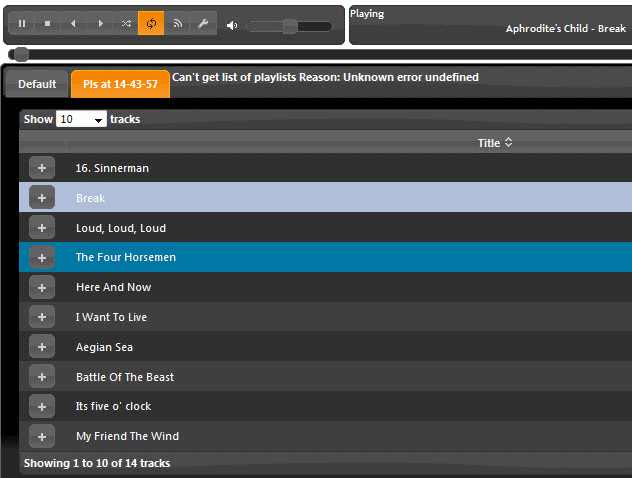
Billy a very lightweight music player for Microsoft Windows devices that ships with a couple of extra features besides playback functionality.
We had a look at how you use your media player not long ago, and I've taken a look at some of the ones you mentioned in the comments of the article.
I particularly liked Billy (thanks for the tip Xaro), a no-frills (but also uncomplicated) music player, which does exactly what I want it to do. Play my music without downloading a heap of metadata for it, and without taking a chunk out of my RAM.
The download is a tiny 540Kb, and when running with 15 albums added, it takes away less than 5,000K of memory. For the half a megabyte download you do get more than you think, with full global hotkey support for 13 operations, the ability to record internet radio, Last.fm history submission, this is not as shabby or as simple as you might think.
Billy music player
You can also add your media folders and set up some format rules, the ability to launch multiple instances, etc, but despite all these advanced features the best thing about Billy is that it is small, and extremely usable. You won't be building a fully tagged and organized music database, but if you just want to do some work with set&forget music, tucked away in your system tray, Billy is for you.
As far as features are concerned, there are a quite a few that stand out:
- Very fast loading of mp3 files.
- Can play folder content or playlists directly.
- Can be controlled entirely with the keyboard.
- Low memory and cpu usage.
- Sleep timer.
As far as downsides are concerned, the player lacks features that some users may require. This includes, among others support for mp3 tags, equalizer support, or skin support.
Verdict
Billy is lightweight, fast music player for windows that supports the majority of important formats (flac, mp3, ogg, wav).
Update: Billy has not been updated since 2008, when a last beta version has been released by its author. While it is still capable of playing music on your system, you may notice incompatibilities or features that are not working correctly anymore. It does not support newer audio files for instance such as aac or m4a.
We suggest you take a look at AIMP instead which is not as lightweight, but still lightweight enough to not make a big dent into the computer's available memory when running.
You on the plus side get one of the best free audio players available on the market.

















How do you embbed your billy playlist onto a website such as myspace?
Hey! great to see you did a post on billy, I discovered it years ago, it was specially usefull to listen to music while playing WoW, because I could just leave it there and it didn’t slow my game.
joe, something i want to be sure you understand; smplayer is mplayer. it’s dependent on mplayer. mplayer is the engine it uses. you can configure smplayer to have exactly the same minimal display and behaviour as mplayer, but you have the bonus of a ton of features at your disposal should you need or want them.
Thanks Joe :)
Do I see a paradox in this sentence?
“what i like about mplayer is that it’s invisible. it’s like there IS no media player, it’s just the media itself. when the video file is done, the player disappears.”
So if there was no mplayer, where did the player disappear to after the video file is done? :D
I do understand what you’re saying, and you’re right, mplayer is pretty unique :)
If you like Billy because of its no-nonsense style, then you should definitely try “1by1” (http://mpesch3.de1.cc/1by1.html)
been using Billy for ages. while foobar is my primary player, i use this for music not yet in my library.
i was recently in touch with the author and he said a major update is on the way :)
be sure to check out his other software, there’s some great stuff there!
yeah daniel, mplayer definitely requires a separate app for music (i use winamp).
thanks for the post though, i too prefer small footprint, focused apps (like billy).
i just discovered ghacks a few weeks ago and it’s consistently interesting. keep up the good work :D
ok i checked out smplayer and it’s a conventional media player
what i like about mplayer is that it’s invisible. it’s like there IS no media player, it’s just the media itself. when the video file is done, the player disappears.
that, and i have complete control without a GUI.
left mouse = fullscreen toggle
right mouse = pause/play toggle
wheel = skip forward/back 5 seconds
forward/back buttons = volume up/down
left/right arrow = forward/back 10 seconds
up/down = f/b 1 minute
pgup/pgdn = f/b 10 minutes
space = pause
f = fullscreen
m = mute
plus all the other keys to control audio streams, subtitles, framedropping, etc.
it seems perfect to me, what i don’t understand is why so many people prefer media player guis when they could just watch their video without a gui at all
Hi Joe!
Sorry about that, I can’t read minds yet :) However, mplayer is more of a video player than a music player.
All I needed was an app that can play mp3-s, nothing, and really nothing, else.
I am making the switch to a more powerful laptop in a few weeks, but until then, if I want to run Photoshop, Word, 10 browser tabs, and programming stuff side by side, I need the simplest “additional” tools I can find.
joe, if you like mplayer for vids, check smplayer, which is mplayer perfected.
i was disappointed you didn’t recommend mplayer, that software has changed the way i use my computer.
i will definitely check out Billy though, thanks for that
Nice! I’ll consider it where I need to save memory :)
…guess i should mention that i downloaded the most recent beta version
strange that they don’t mention that billy plays flac, but he does. not ape, though. didn’t try any others.
Meh not every one wants simplicity, my foobar2k config uses around 200mb of memory with every album i own loaded in to a playlist which if i do the math is around 330gb of music.
That and i like all the metadata, album art and lyrics.
It can’t play .asx files.
I discovered Billy from the same “how you use your media player” post you refer to and I have been using it ever since.
Media players these days are way too bloated and confusing and I find Billy to be the complete antithesis of the media players I have grown to despise (like iTunes and Windows Media Player).
I still have Foobar2000 handy for when I want to burn, tag, etc.. but more often than not I simply want to play my mp3 albums while I multi-task on my computer and Billy is the perfect player for that because it takes virtually no resources away from my other efforts.
I definitely have to try this out. Sounds great for gamers who wants to play music while gaming without having their Media Player take half of their resources.