
Microsoft Outlook Mail Autocomplete Manager

NK2View is a free portable program for Microsoft Windows computer systems that you may use to manage Outlook autocomplete data.
Whenever you enter an email address in the to, cc or bcc fields of Microsoft Outlook they get automatically added to the autocomplete list of the email software if you hit the send button.
This autocomplete list grows over time and may contain not only valid email addresses but also those that are no longer working or needed, and those with typos.
Microsoft Outlook mail autocomplete manager NK2View
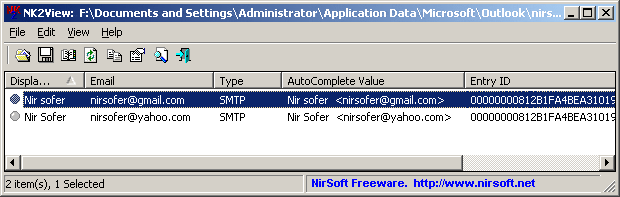
The Microsoft Outlook mail autocomplete manager NK2View by Nirsoft is a portable software for the Windows operating system. It provides you with functionality to view, delete and edit all email addresses that are stored in Outlook's autocomplete database.
The software program can be used to load a valid Microsoft Outlook n2k file after startup, and this is what you need to do first to get started.
It displays the information in the usual table layout that is known from many other Nirsoft applications like the one that can be used to display and save email attachments in Outlook. Columns that are displayed are the display name of the user, the email address, the autocomplete value, the protocol, the recipients field and the cryptic entry id and index parameters. They can be sorted for easier access, for instance by email address or autocomplete value.
The Outlook tool ships with options to backup and restore n2k files, and options to manage them. Creating a backup before processing the file is recommended as it is the only way of making sure that the file can be restored if something goes wrong during the editing process.
The usual options to export information to various formats such as xml, txt, html or csv are provided in the interface. Another interesting option is the ability to add entries from an Outlook address book to the autocomplete file.
Several command line parameters are available that can be used to execute the Microsoft Outlook autocomplete manager without using the graphical user interface.
Update: Nirsoft has created a new program called NK2Edit which offers all the functionality of NK2View and then some. Additional features include copying records from one autocomplete file to another, changing the order of entries or build a new NK2 file and add information to it.





















This is a FREE Outlook NK2 auto complete cache rebuild tool. Its easy to use and very slick.
http://www.outlooktip.com/install-outlook-nk2-autocache/