
Rearranging and making any website print friendly

PrintWhatYouLike is a free online service that allows you to manipulate web pages before you send them to your printer to print them out.
I felt weird all day today so I spent an hour stumbling around the web, which yielded some quite cool results. One of them is Print What You Like, a truly awesome service designed to help you print only what you need, and to save the environment, nice combination!
If you want to print a web page you are either stuck to selecting a piece of text, or printing the whole page as is. If you are lucky there's a printable version, but this removes everything except the text, so again, not too flexible. Print What You Like let's you enter a website which it renders for you, enabling you to remove any elements you don't need.
Print What You Like
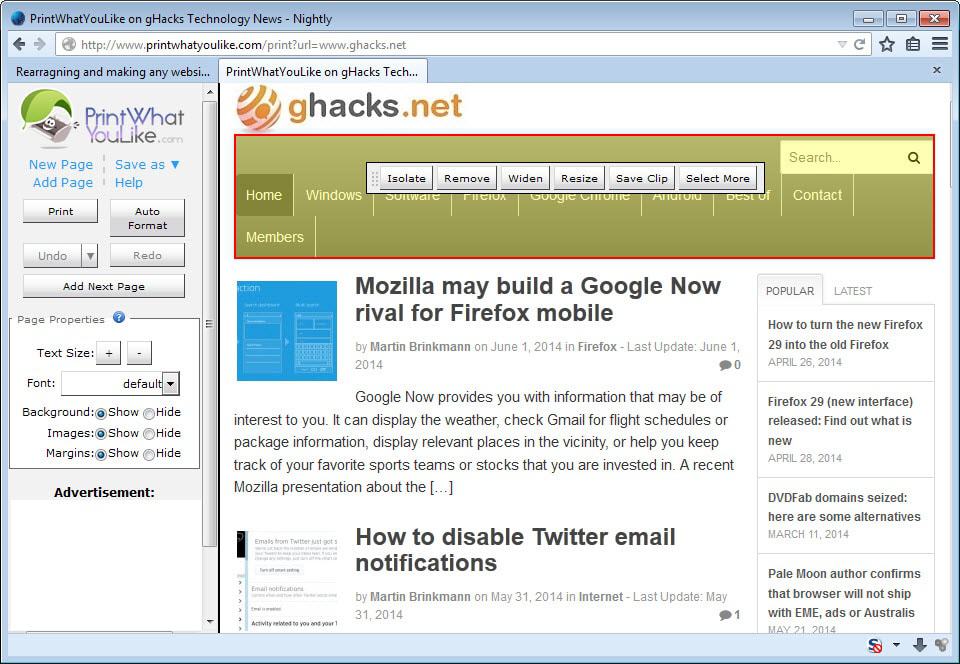
The flexibility here is really great, you can literally add or remove any element whatsoever. You can select paragraphs and resize them horizontally and vertically, all content will get pushed along as it should. You can even change the text size and the text font.
You can remove all images and backgrounds with one click if that's all you need, but tweaking is up to you, you can delete as much or as little as you want.
Just move the mouse over elements and click to mark them. The application highlights the current element with a red outline automatically so that it is easy to select the right item for manipulation.
While you can remove items, you can also resize or widen them among other things. Besides that, you can also change the size of text and the font used to display the page using the sidebar menu.
There is also an option to add more pages, taking text or images from multiple sources, you could create a little web-book of your favorite posts of the week.
The features are really great and printing what you need has never been made so easy. Just a tiny addition, the ability to move items on page would have been nice. This is a great idea and it is executed very well, I recommend this to anyone with printing needs, in the end you might spend less ink on it, saving you money and helping the environment.
You can access the service directly on the Print What You Like website, add it as a bookmarklet to any web browser supporting bookmarklets, or install a Google Chrome extension instead which offers the same functionality.


















Very cool. Neat idea. Thx
This site is very look awesome. Can you unblock a site? Feel free to browse our site.
Hi Jonathan!
Moving stuff around would be helpful anyway, I could make blogs double-columned and so on.
I could also put the lowest price next to the most expensive apartment ;)
Thanks!! Awesome review! The idea of moving around elements on the page is really cool. I’m sure there are all sorts of interesting uses for it. For instance if you were looking at a page summarizing various apartments, you could move the date available and the price of each apartment to the top of the page. I’ll work on adding it.
Thanks.
This is a nice find.