
Uninstalling Features In Windows 7

The release candidate of Windows 7 comes with a surprising new feature in the Control Panel that will please many advanced users. A main point of criticism for users of previous Microsoft operating systems was a lack of uninstallation or removal options in regards to software that ships with the operating system.
Programs like Windows Media Player, Internet Explorer or Windows Search feel like excess baggage if you never make use of them. Sure there are programs like nlite that you can use to remove some of the components from the operating system in a somewhat complicated process, but those where usually only used by advanced users with lots of time at their hands and knowledge when it comes to what you can remove and what you should not.
Microsoft made an announcement the other day on their Engineering Windows 7 blog which mentioned feature uninstaller improvements in Windows 7. The Windows Features control panel entry allows users to remove - or add - Microsoft programs and Windows components. Windows XP and Windows Vista operating systems made use of a similar but limited feature.
Uninstalling Features In Windows 7
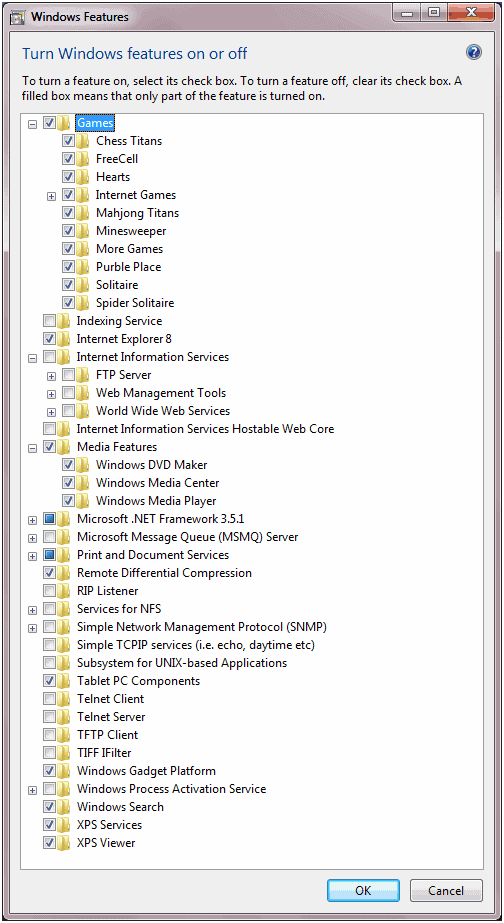
The release candidate of Windows 7 on the other hand provides access to additional programs and features that can be disabled or uninstalled by the user. Software that has been added are Internet Explorer 8, Windows Media Player, Windows Search, Microsoft .net Framework 3.5.1, the Windows Gadget platform and others. This is a major strategy change as Microsoft was previously seen as a company that never removed but always added to their operating systems.
But what does it mean to disable a feature in Windows 7?
If a feature is deselected, it is not available for use. This means the files (binaries and data) are not loaded by the operating system (for security-conscious customers) and not available to users on the computer. These same files are staged so that the features can easily be added back to the running OS without additional media. This staging is important feedback we have received from customers who definitely do not like to dig up the installation DVD.
It is interesting to note that the files will not be loaded by the operating system. Even more interesting would be benchmarks that compare operating system loading time with and without the features disabled. Security conscious users on the other hand will most likely disable many of the features even if disabling them does not provide any other advantages but to computer security.
Users need to note however that the actual files are not removed from Windows usually. This means that they are still available, so that saving hard drive space won't really happen when you remove native Windows features.
Verdict
Getting rid of programs and features that you don't need to use can be beneficial in several regards. First to keep the operating system lean, and second, because it may reduce the attack surface as you may disable features that are targeted by attacks or open ports on the system.


















Windows7 is full of excess baggage that cannot be uninstalled,
I absolutely hate windows 7
Learn to distinguish lies from truth.
This is a gimped version of services.msc combined with add/remove components.
Advanced Users are SMART… this? This is dumbing it down.
Windows 7 came with a new computer I recently acquired. I need to get rid of that insidious Windows Messenger program that loads itself and remains in your face at every turn.
The info above isn’t quite helpful since nowhere in the Control Panel is there a way, at least that I can find, to turn this component on or off. If there is, can you direct us?
what is the size of a standard installation of windows 7 and what is the size of it after you disable everything and can one remove the extra files
The size will be the same, nothing is really removed, just disabled.
The 64bit version is about 15 Gigabyte (!)
I had Windows 7 beta on a dual boot. I decided to make it my main OS. I love it
Windows is getting better and better..