
Registry Cleaners: Comodo System Cleaner

Comodo System Cleaner is a computer cleanup tool that combines the functionality of registry cleaners, disk cleaners and privacy cleaners in one application.
The software can be used to scan the registry of the computer system for invalid entries, clean temporary and duplicate files from hard drives, and to clean privacy related information like log files, last visited locations or history databases.
The registry cleaner tool scans the Windows registry for various invalid entries. Each entry is shown after the scan with the possibility to clean it up. By default, a backup of the registry is created before any cleaning takes place. It is furthermore possible to schedule regular registry cleanups, or restore a previously created registry backup.
Comodo System Cleaner
The disk cleaner is a basic tool that scans the hard drives of the computer for temporary or duplicate entries giving you options to delete those files from the disk. It is nowhere as extensive as tools like CCleaner offer but it covers the most widely used temporary locations.
The disk cleanup utility can be scheduled in the same way as the registry cleaner. Filters can be added to include or exclude certain file types from the scans.
The privacy cleaner finally offers options to delete several privacy related entries from the operating system
Other tools that are provided by Comodo System Cleaner are a disk wiper, a tool to calculate file crc and extensive system settings that match most Windows tweakers out there.
Comodo System Cleaner combines several important system utilities in one application. Users who are looking for tools to cleanup temporary data are currently better of with tools like CCleaner who have the advantage that they can be further customized by the user which Comodo System Cleaner cannot.
Comodo PC TuneUp
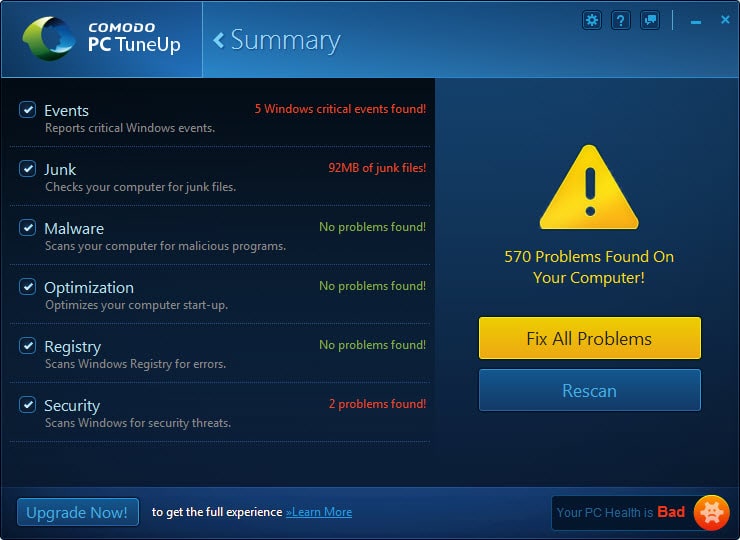
Update: The program seems to have been renamed to Comodo PC TuneUP in recent time. There is no trace of the free System Cleaner on Comodo's website anymore, and it seems as if PC TuneUP is not offered in its place.
One issue that you will notice directly after the initial scan is that you cannot display details of what is wrong with your PC. While Comodo's program displays the hits and issues as generic information, there is no option to find out what it has actually discovered. Are the two security problems related to software or updates, or something else? There is no way of telling.
Comodo System Utilities

Update 2: The program is called Comodo System Utilities now. The interface has changed as you can see on the screenshot above. The Pro version is still called Comodo PC TuneUp though.
A couple of new features are supported by the new program version. You find a Shredder tool listed in the sidebar for instance which enables you to permanently delete files, folders, partitions or entire hard drives to prevent file restoration.
Another new tool is Force Delete which allows you to delete files, folders or registry keys that cannot be deleted by normal means.
Verdict
Comodo System Utilities ships with a collection of maintenance related tools that Windows system administrators may run to free up disk space, correct errors, remove autorun entries and more. It is comparable in this regard to other system tools such as Advanced Systemcare Free or System Mechanic.





















I can say that Comodo System Cleaner is one the best registry cleaners availavle in the software market now. it is an useful clean up tool which helps you to get rid of almost all the errors in your registry. Thanks Martin for your review.
Registry cleaning freewares are available online and the users have to download it to their computers to clean their registry. After downloading the appropriate version of the registry cleaner that is suitable for your OS, the program has to be installed into the system. Installation process is very simple and is less time consuming. For Windows XP users, the need to reboot the system after installation is absolutely not needed. By running the .exe file placed on the desktop, the program will be launched without delay.
There are 100+ title of registry cleaners on the market. Download and scan your PC to compare them. Sometimes the free version better than the paid version. Great post. Thanks.
An “extensive system settings” : beware of that particular module unless you know what you are doing, this is not for newbies, moreover in consideration of the fact that, contrarily to a software like X-Setup, ‘Comodo System Cleaner’ does not describe in depth the meaning of, the consequences of modifying, the settings it displays for tweaking : beware !!!
Thanks for this – it’s really helped me!
I find this an excellent cleaner with categories of registry keys that are somewhat defined in the help so that they are better understood as to what is being cleaned. Included is a category of UNSAFE entries which by default are not checked off but reviewable.
I recommend running something like CCLEANER fist .
I realy like the program jv16 power tools 2009. It cost a bit but then you get realy The best there is for registry cleaners,privacy cleaners and much more.
Next to that ccleaner is the top for grap cleaning.