
Thunderbird Delete Confirmations

The email client Mozilla Thunderbird does not come with delete confirmations turned on by default. There is also no option in the Thunderbird settings to activate delete confirmations. The advanced config editor does list two entries that might be there to enable delete confirmations but there is zero information to be found on the Internet about those two settings. Even if those settings would enable delete confirmations they would do so for all emails and folders.
Delete Confirm is a Thunderbird extension that adds delete confirmations to the email client. It is possible to enable delete confirmations on a per folder basis in Thunderbird. The Trash and Send folder delete confirmations are enabled by default while they are turned off for all other folders.
A right-click on a folder and the selection of Properties will display a checkbox to enable or disable delete confirmations. The extension will display a popup if the user tries to delete an email that resides in a folder that has delete confirmations activated.
Delete Confirm is compatible with all Thunderbird 2 versions and can be downloaded right from the Mozilla website. The add-on is experimental which means that the user has to log into the Mozilla website before downloading the add-on.
Update: The Thunderbird extension has been discontinued. An alternative that is actively developed is Confirm Before Delete. The extension is compatible with all versions of the Thunderbird email client. When you delete a message in Thunderbird after installation you will always get a confirm prompt that looks like the one below.
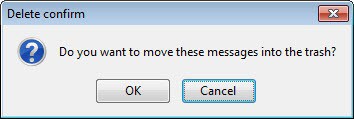
You can modify a couple of settings the extension makes available to you. It is for instance possible to configure it to block the deletion of all messages. The extension blocks automatic deletion even if you use Shift-Delete to do so. You can however modify the behavior so that Shift-Delete deletes messages automatically and without confirmation.

The following options are available:
- Block the deletion of messages
- Enable the confirm to delete the messages with Shift-Delete
- Enable the confirm to move the messages to the trash folder
- Enable the confirm to empty the trash
- Enable the confirm to delete the messages and the folders from the trash
- Enable the confirm to delete the addressbook's contacts
- Enable the confirm to delete items in calendar and agenda



















