
Minimize Firefox To The System Tray

Do you like your taskbar clean and shiny? Are you one of those users who prefer to minimize to the system tray instead of the taskbar?
If you have answered the questions with yes chance is that you will love the Minimize to Tray add-on for Firefox. Minimizing a regular installation of Firefox 3 will display the Firefox 3 icon in the taskbar with no option to minimize it to the system tray instead.
While that is often the desired, as you can bring the window to the front quickly, you sometimes may not need it there. Say, you are listening to Internet radio in the browser, or know that you won't need it in the next couple of minutes or hours.
It only takes the installation of the Minimize To Tray add-on to change that behavior so that Firefox will from then on minimize to the system tray instead.
The add-on comes with three options that configure the behavior: Firefox can be configured to always appear in the system tray when minimized, to only appear there on close and that it requires a double-click to be restored from the system tray.
Minimize To Tray is an excellent add-on for all users who prefer to minimize application windows to the system tray instead of the taskbar.
Update: Please note that the original Minimize to Tray extension for Firefox is not compatible with the most recent versions of the Firefox web browser anymore.
You can however install MinimizeToTray revived which is. The extension works in a similar fashion and is compatible with all Mozilla products including Firefox and Thunderbird.
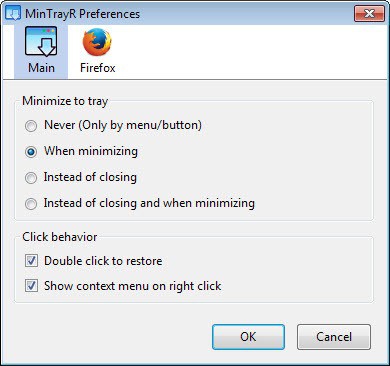
The extension will minimize Firefox to the system tray automatically when you click on the window's minimize button. You can change that behavior in the options.
Here you can configure minimize to tray to become active when you close the the browser, close or minimize, or never. The last option will only minimize to the tray then if you invoke the feature using the menu or button the add-on adds to the browser.
A double-click on the icon restores the browser window again, while a right-click will displays a context menu instead.
Only the browser window is handled this way by default. You can enable the functionality for the bookmarks and downloads window as well.




















Thank you!
Does what it says, but I have uninstalled because there is a compatibility issue with tidyFavorites bookmarks program. If tidyFavorites is idle no problems, but once a thumbnail is clicked in tidyFavorites with minimizetotray enabled it opens a separate and new Firefox instance. Didn’t even notice until I had five or six instances open and Firefox performance had degraded. Oh well, I use the Thunderbird version and it works well.
Really Nice.
[…]
Fonte .: ghacks.net : minimize firefox 3 to the system tray
[…]
Thanx, most times I rather not have a separate minimize to tray program running, but this add-on is useful and it works with the window I have open the most.
thats is cool!! thanks for the info.