
SpeedCrunch Multi-OS Calculator

SpeedCrunch is a versatile calculator for multiple operating systems including Microsoft Windows, Apple Macintosh and Linux. The calculator is still an early development version, but it contains several interesting options and functionality already that extend regular calculatosr that ship with operating systems.
The SpeedCrunch calculator supports two main modes of operation. You can type the calculation manually into the interface or paste it from the clipboard instead. Especially the second option can be quite useful if you have the calculations in front of you already.
The calculator comes with a math formula book, constants, functions, permanent variables and a history feature. One of the interesting features is syntax highlighting. SpeedCrunch will display the calculation in various colors which makes it easier to verify the equation.
Another helpful feature is auto complete which will display matching functions, constants or variables.
SpeedCrunch supports more than a dozen languages and can be downloaded right from the developer's website.
The newest version looks different from the screenshot above. When you first start it up after installation, you will only see an input field at the bottom and nothing else.
You can add sidebar items from the view menu if you want, for instance the formula book or the history for easier access to past calculations.
Simply enter an expression into the field at the bottom, or paste one in, to get the result displayed in the interface.
The calculator displays the expression as well so that you can double-check at all times to make sure everything is correct.
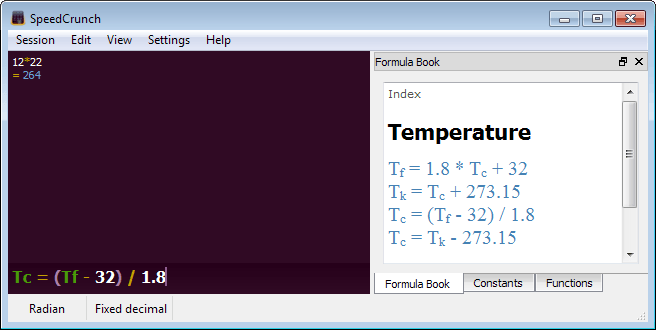
The formula book is great for looking up formulas, such as Ohm's Law, Quadratic Equation, or temperature conversions.
The other sidebar items can also be helpful. Constants displays a list of constants to you that you can further filter by fields such as Astronomy, General Physics, or Atomic & Nuclear to name three.
Functions let you add functions such as modulo, median or logical not to the expression so that you can use those directly as well.
Each sidebar item that you enable is displayed in tabs, so that you can switch between them directly in the interface.
All in all a handy third-party calculator that offers better functionality than your system's default calculator.
Advertisement


















Cool tip Martin. I also like the Garbanzo tip.
Why do NOD32 tell me that is a virus?The download is http://speedcrunch.googlecode.com/files/SpeedCrunch-0.10.1.zip…. CAn you help me?Thanks
Do you know that you can use your keyboard instead of mouse?
that looks nice! though i really prefer using RPN, so i’ll stick with calculator.net (windows only)
http://www.speech.kth.se/calculator/
Computer calculators will be much more useful when every computer has touch screens like phones have.
Now, I find using a stand-alone calculator easier than moving the mouse back and fro to click buttons on a computer calculator.