
Internet Cookies Manager

You do not find many Internet cookies managers out there that let you manage cookies from all installed browsers -- or at least a selection of popular ones -- directly in one interface.
Cookie Monster (via Madhur) is such a program. It is a portable application for Windows that supports the following web browsers: Internet Explorer, Mozilla Firefox, Google Chrome and Opera. It does work with most browsers based on Internet Explorer or the Gecko engine as well even though those are not mentioned explicitly.
The Internet cookies manager will display all cookies in its interface after startup. Note that it will throw an error message if a browser is open at the time of launch. It cannot read Firefox's cookies for example if the browser is open at the time of launching the program.
All cookies are sorted by name in the interface starting with numbers and then alphabetically. An icon indicates the browser it was found on so that you know where it cam from. Here you also find the domain name listed that set the cookie as well as its name.
You can scroll the list right away or use the search at the top to find cookies from a particular domain or with a particular name.
A double-click opens a new window with detailed information about the selected cookie including its raw data provided that it is not made available in binary format.
At the very least, you get information about its creation and expiration date, whether it is a secure cookie, and in which folder on the system it is located in.
You can use Cookie Monster to delete selected or all cookies from the computer system right away. One interesting feature is to set cookies as protected which protects them from being deleted. You can save the protected list for safekeeping, but it will be loaded on startup automatically.
Another interesting option is to match cookies to the favorites (of Internet Explorer it seems) to automatically add those found to the protected cookies list.
Cookies will be cleared regardless of web browser that they were discovered in, provided that the browser is not running while the program is at work.
It is probably best to make sure that all browsers are closed before you run Cookie Monster to avoid any issues in this regard.
You can change the path of browsers in the options. This can be useful if the browser is not picked up automatically by the application, or if you want to add another browser profile or a portable version of a browser to it.
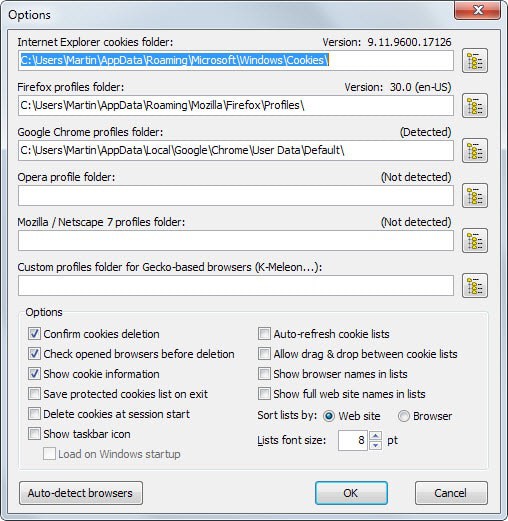
Other options provided here include sorting cookies by browser instead of web site name, auto-refreshing the list or disabling the confirmation of delete requests.
Verdict
Cookie Monster is a great application that is available as a portable version and setup version. It is versatile in regards to the browsers it supports as you can add locations manually in the program options which means that nearly every browser in existence is supported by it.






















The only cookie manager I need is the “Delete All” button.
Two in a row for me. I also use Renamer, the application featured in the previous post.
In conjunction with Cookie Monster, I use Index.dat Analyzer to manage cookies.
http://www.systenance.com/indexdat.php