
Have WordPress back-ups emailed

We are always told how important it is to back-up our blog, in case it is hacked, which can happen from one minute to the rest. My personal blog, Webby's World, I am ashamed to admit, has been hacked a few times.
Backing up seems somewhat of a chore and whilst a cron job can be set up, a WordPress plug-in makes backing up a blog's mySQL database absolutely hassle free.
WordPress Database Backup allows database backups to be emailed, saved to a hard disk or saved to a server.
Having the back-up emailed may be favourable, especially if you use a service like Gmail with large amounts of storage and reliable hosting.
A useful trick is to set up a Gmail filter to separate backups so quick access is available. Different tables can be backed up, so spam and statistics can be excluded.
Databases can be gzipped, and the SQL file inside the archive can then just be imported should the weblog to be hacked.
Naturally, WordPress Database Backup does not back up files, so images, templates and plugins must be backed up separately.
Update: It was not really clear when the backup plugin for WordPress was updated the last time. We have therefore removed the link and suggest you use the Simple Backup plugin instead. First advantage: it is listed on WordPress' official Plugin Directory. Second: it is up to date and fully compatible with the latest working version of WordPress.
It does require a Linux server that can create tar, gzip, bzip or zip files for backup creation. The plugin creates a folder in the WordPress root where the backup files are stored in.
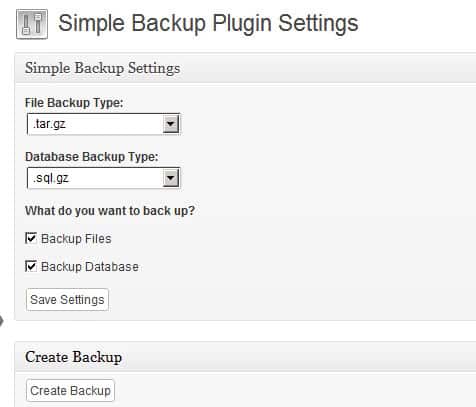
If you run into troubles check the folder and make sure that it is writable.
It is recommended to protect the directory from direct access, for instance by using htaccess to disable directory listings, or by placing a simple index.php file that is blank in the directory.
Your web hoster may also provide you with means to back up your WordPress blog - including any MySQL databases it uses - regularly. This is usually the better option as it is more secure than this one.
Advertisement














any sites available to backup blogspot ,in your view which is the best
I have used this plugin for a long time, got one issue it the database size is more than 20 mb it crashes while importing via php my admin