
System Protect protects Windows Files
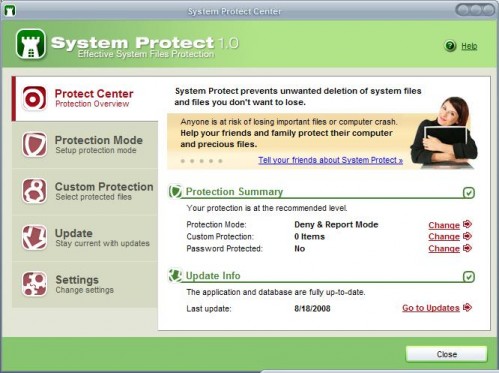
System Protect can protect custom files and folders as well as system files in Windows. By default all files and folders that are necessary to run the operating system are protected by the security application.
Protected in this case means that deleting and modifying protected files is denied to the user and programs that run under the user account. This setting can be changed in the program's options to allow system changes on the user requests which is for example helpful during system updates.
Update: Please note that System Protect is no longer available. We have uploaded the last release version of the program to our own download server. Please note that we don't support it in any way, and have done so for archiving purposes only. You can download the program with a click on the following link: (Download Removed)
System Protect
An access denied window pops up when the user tries to delete or modify a protected system file. This popup notification can be disabled in the options if you prefer not to be notified about incidents.
Besides protecting important system files, System Protect can also protect custom files and folders that have been selected by the user. This is done by adding those files and folders to the Custom Protection tab in the software program's settings.
Information about files and folders that are protected are stored in a database that gets regularly updated just like the virus definition file of a antivirus software. That's a good way of keeping up with system changes initiated by Microsoft and other software vendors.
System Protect is compatible with Windows XP 32-bit and 64-bit editions as well as Windows Vista 32-bit editions.
Closing Words
System Protect is a handy program for Windows to add another layer of protection to the system. It is too early to tell how well it handles these situations, especially false positives when Windows wants to make modifications to protected files, for instance during updates.






















looks like a rogue to me.
Does it slow down the system?