
Whitelist Bookmarks In Adblock Plus

Adblock Plus is a Firefox add-on (Update: now also available for other browsers such as Google Chrome) that blocks advertisement, and sometimes other elements, on websites. It supports black- and whitelists and is very flexible. One thing that is missing is an option to generally whitelist all bookmarks.
Some users may prefer do whitelist websites on a per-site basis and that is perfectly reasonable. Others prefer to whitelist all bookmarks at once which is not doable in the options of the add-on. The author of the add-on however has created a script that takes the contents of a bookmarks file and creates a whitelist file out of it.
The process itself is pretty simple, users do need to have access to their bookmarks in html format though. Firefox 2 users can simply access the bookmarks.html file in the Firefox profile folder while Firefox 3 or later users need to export the bookmarks into html format first which can be done in the Bookmarks Manager.
To do so, press the Alt-key to bring up the menu bar, and select Bookmarks > Show all bookmarks from it. Here you need to click on import and backup, and there on export bookmarks to HTML.
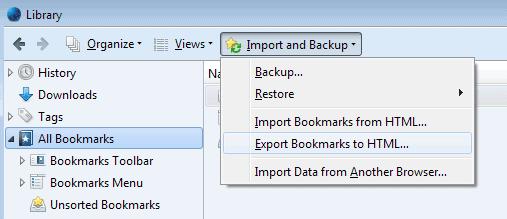
Once the file is available it has to be opened in a text editor. All contents need to be copied and pasted into the script on the Adblock Plus website.
That script will generate a whitelist file for Adblock Plus which can be imported in the preferences of the add-on.
Update: The script on the Adblock Plus website to generate a whitelist of all bookmarked pages does not seem to be available anymore. The page now redirects to the homepage of the project. The only option you have at this point in time is to whitelist domains that you visit manually. While that may require lots of work, depending on the number of bookmarks and the percentage that you visit regularly, it is the only viable option to do so.
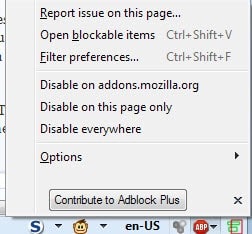
It may not be ideal but it provides you with control over the whole process. Just click on the Adblock Plus icon in the browser toolbar and select to either disable advertisements on the page you are on, or for all pages of the domain.
Advertisement
















