
Make Gmail the default Firefox Mail Client

If you like to access your Gmail account on the official website and not in a desktop email client, then you may have noticed that it is not really that easy to get so called mailto: links open up in the web interface when you click on them. Instead of Gmail, Outlook or another desktop email client may open up which is probably not what you want.
The official Gmail blog posted a tip recently on how to make Gmail the default mailto handler in the browser, so that a click on an email address opens Gmail and not another client.
It is relatively easy to do so, but only if you know the process. I'm going to show you how to configure Firefox in a way that Gmail is opened when you click on emails in the browser.
Setting up Gmail as the default mail program in Firefox
The first thing you need to do is visit the official Gmail website and sign in if you have not done so already. Follow the instructions below once you have done so:
- Press Ctrl-Shift-K to open Firefox's Web Console. Alternatively, press the Alt-Key, and select Tools > Web Developer > Web Console.
- Paste the following line of code into the form here and hit the enter key afterwards.
javascript:window.navigator.registerProtocolHandler("mailto","https://mail.google.com/mail/?extsrc=mailto&url=%s","Gmail")
You should see a notification at the top of the Gmail page that informs you that Gmail has been added as an application for mailto links. You may need to click on the add link displayed here to add it to the browser.
Once you have done that, it is necessary to select the newly added handler as the default program for Gmail. Proceed with the following steps to do so:
- Press the Alt-key again on the keyboard and select Tools > Options from the menu bar.
- Switch to Applications here and enter mailto in the search on top of the screen.
- This should display only one entry, listing the program that is currently being used to open email links.
- Click on the program and switch to Use Gmail in the options.
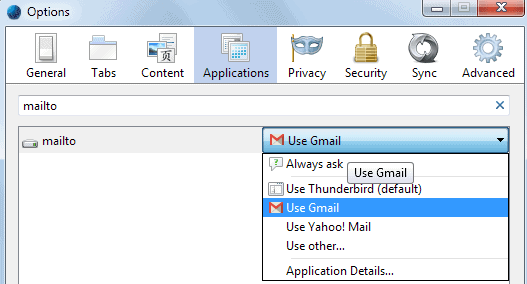
Close the settings dialog afterwards and test the newly made setting by clicking on an email in the browser. You should notice that the Gmail compose window is automatically opened when you do so.
You can change the preference back at any time, to a different email client, or, if you prefer that, to always ask which displays a dialog that you can then use to pick one of the available email clients.
Advertisement


















This is so GREAT, thanks! Now, can anyone tell me how to actually make the new email open in the current Gmail tab (using tabmixplus) instead of overwriting the tab with the link? I’ve had it work that way in the past, but it’s not now, don’t get it….
Sharon
I paste
protocol:javascript:window.navigator.registerProtocolHandler(“mailto”,”https://mail.google.com/mail/?extsrc=mailto&url=%s”,”Gmail”)
into the location, hit enter, and Firefox says that it can’t open this location because protocol(protocol) has no program associated with it.
Thank you, Martin! I had done the first step (copying that line into the URL bar), but not the second step (Tools>Options>Apps). It works now! Thanks again!
Here is the other fix:
http://www.businessmarketingguru.com/news/firefox3-and-gmail-bug-fix
okay, copy and paste this code into the URL? I do and it says “done”: in the lower left corner of Firefox. I think Vista and Firefox 3 both are getting toooooooooo GUI. Vista is reminding me of Millennium Edition so much that it sux. I want XP back, but my Toshiba would have nightmares due to my on board wifi.
after i added this to my gmail, every new email i type now gets this inserted into the body of my email:
Compose new
Inbox
Starred
Chats
Sent Mail
Drafts
All Mail
any ideas why or how to get rid of this? it sucks
I am reading your blog for quiet a while now but this is the first time i post something here ;)
Thanks a lot for the nice and amacingly interessting blog, and special thanks for this artikle, i have been rly looking for something like that =)
If you’re using the Tab Mix Plus extension and have it set to open typed URLs in a new tab, disable it before following these steps. Otherwise, entering the script above will just open a new (blank) tab with no effect.
OK, got it! Thanks!