
How to close multiple windows in the taskbar at once

New Explorer folders are always opened in a new window on my system because I think it's a comfortable way to work with folders and windows. I never liked the default way of opening a new folder in the same window in Windows Explorer as I had to launch a new Explorer window anytime I wanted to have direct access to multiple Explorer windows at once.
The problem with opening each folder in a new window however is that it may spawn a lot of windows on your system. Say I want to navigate to the Firefox profile folder which is deeply nested on the system. When I do so, I open five or more folders along the way which I do not really need anymore.
To deal with this, I'm using an option that not all Windows users know about. It allows me to close multiple windows at once from the taskbar of the system.
Even better, you do not need third party software, add-ons or any other hack or tweak to do so, and I have to admit that it saved me quite some time throughout the years. To close multiple folders at once, simply hold down the CTRL key to select multiple folders that you want to close by clicking on them.
Once you have selected all the folders that you want to close, right-click on the selection and select the Close Group item from the context menu.
This closes all selected folders at once. The method works really well and can not only be used to close multiple Windows Explorer folders at once but also other programs that you may have open on the computer. You can even select folders and programs at the same time to close all of them.
Update: Please note that the method is not working on newer versions of Windows. What you can do however is right-click on a stack of folders or programs in the taskbar to close them all at once.
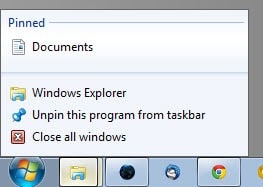
Note that you can only close all or the selected window in newer versions of Windows, and not customize that selection unless you select the "never combine" option in the taskbar properties.

















http://qttabbar.wikidot.com and http://cn.ejie.me can solve this problem
the 1st one is QT-Tab-bar, WITH Multi setting.
the 2nd one is clover, simple to use, just like chrome tabs.
and both of them are free.
The Author forgot to say that
the requirement for this “trick” is you must enable “Always Combine”
in Taskbar Properties which in my case I do not want to do….
Hello again Martin. You can use this same technique to tile multiple windows on your screen:
http://www.associatedcontent.com/article/437645/secret_windows_tip_improve_productivity.html?cat=59
Very handy if you don’t have multiple monitors (like on my laptop).
I did not know this trick, thanks :)
Brilliant! This one’s up with the ctrl key held when clicking the top-right ‘X’ window-close in order to remember its settings.
Is there a definitive list of these key combo’s available?