
Do not move Special Folders in Windows to root

If you are using Windows you know that you can move special folders, like the My Documents folder or Downloads folder, to another folder or even drive in Windows operating systems such as XP or Vista.
Special folders are automatically created by the operating system to give users a central location for data such as photos, videos or music. The directories can easily be changed using the location tab in the properties menu that you can open when you right-click the folder.
It is highly recommended to add the full path when you move the folder to another location on the computer. If you want to move the Downloads special folder to drive e: for example, you need to enter the full path which is e:\downloads in this case.
The reason why this is important is that Windows does not automatically append the folder name to the path. This means that if you enter e: as the path Windows Vista will assume that this is the path to the download folder. The problem arises when you try to change the location again because Windows will move all files on that partition to the new location. Think of it, if e: is the special folder then all contents on that drive have to be moved to the new folder which can be very bad not only because of space requirements but also because some files may not be moved by the process.
This process will not complete because of System Volume Information and $Recycle.Bin which cannot be moved. The only way to fix this is to change the path of those folders manually in the Registry.
The location of all special folders is stored in the Registry:
HKEY_CURRENT_USER\Software\Microsoft\Windows\CurrentVersion\Explorer\User Shell Folders\
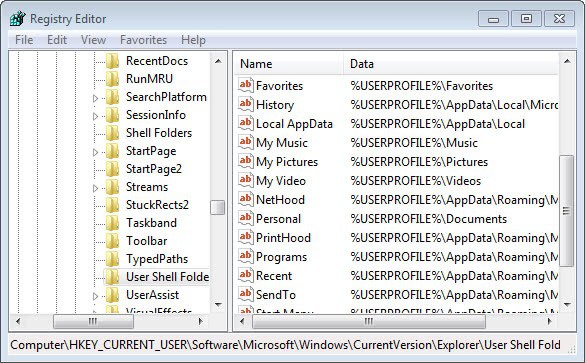
Just change the value of the special folders that you have changed to the new folder and restart the computer afterwards so that the changes take effect.
Note that you may experience the issue if you set new special folder locations in the Registry directly. While the issue came to live under XP and Vista, it is still one on new versions of Windows up to the very latest version Windows 10 (that is currently out at the time of writing this update).
So, make sure you always add the folder name of the special folder that you want to move to avoid this issue.
















