
Increase Number of Recommended Add-ons in Firefox 3

One of the new interesting features in Firefox 3 is the revamped add-ons manager that now recommends add-ons that are compatible to a user's Firefox version.
It would be interesting to see how many Firefox 2 users are actually running the browser without any add-ons installed and how this will change with the release of Firefox 3.
By default five recommended add-ons are shown when you perform a search on the about:addons page which is equivalent to the number of recommended add-ons on the Firefox homepage.
Five is not exactly a huge number of add-ons and it is nice to read that this number can be changed in the Firefox options.
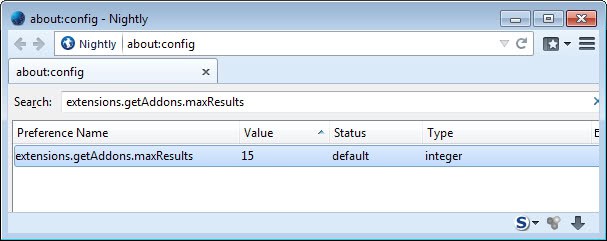
Update: Mozilla seems to have increased the value to nine add-ons in recent versions of Firefox. The preference mentioned above on the other hand has a default value of 15, but any value above 9 seems to be ignored by Firefox.
I do not think that this feature is required by power users though who know where to get their share of add-ons. Casual users on the other hand may like the new add-on manager and use it to download the recommended add-ons, especially since it is built-in to the browser and does not require that you open the official Mozilla Add-ons repository or a third-party site to find out about new add-ons for the browser.
To change the number of recommended add-ons in Firefox 3 do the following:
- type about:config in the location bar
- Hit "I''ll be careful. I promise!" button.
- Filter for extensions.getAddons.maxResults and change the value from 5 to another value between 0 and 8
Yes eight seems to be the maximum for now. You need to restart the web browser after you change the value. Note that any value above 9 has no effect. It is not clear why the default value is set to 15 despite that.
Advertisement

















