
CD to HTML

CD to HTML is a free software program for Windows that you may use to create an HTML file listing directory and file information.
You can select any directory as the root of the structure provided that the drive or disc is connected to the Windows PC at the time. This makes it an excellent tool to create an index of all files and folders of a CD or DVD, but also for backups.
You may include the index on the CD or DVD for instance for faster access of files burned to the disc. This may not help much if you burn a couple of files to the disc, but if you burn hundreds, it could save you quite some clicking.
CD to HTML offers a comfortable option of creating indexes of files and folders. While ideal for the archival of optical discs, it can also be used for other purposes, for instance a HTML list of all music or video files stored on the system.
CD to HTML
The process itself is fast and simple. You select the root directory (source) in the beginning. You can select a drive letter as the source, for instance a DVD drive, or any other folder on the system.
Once you have made that selection, you set the target directory and file of the HTML file that the program creates. CD to HTML picks the root folder that is selected as the title automatically, but you can change that. You can change the title in the same menu if you prefer a different title.
Please note that the target folder will also be the root folder for the links to the files. This means that it's important to create the HTML file in the root folder if you pick a folder on the hard drive as the source.
The program provides an option to create a autorun.inf file which is useful if you want to burn the HTML file and files to CD later on.
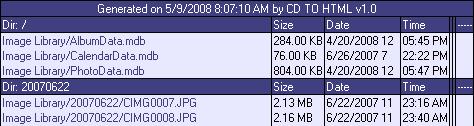
The HTML file that is created lists all folders and files on a per folder basis providing information about file sizes, creation date and time.
Closing Words
CD to HTML is a handy program to create drive, folder or disc indexes of files and directories on Windows machines.
Update: The application is no longer available on the developer website. We have uploaded the latest release version of CD to HTML to our own server. Note that we don't support the program in any way, and that we have done so for archiving purposes only. You can download the program with a click on the following link: (Download Removed)






















typo: 1. an html file
2. an index of files
This is a very useful tools ! The other one, the indexmaker have the same function but it takes from you harddrive which is also useful !
Thanks for sharing.