
Type less to access websites faster

I'm using the bookmarks toolbar in Firefox to access websites with a click - or two - of the mouse button. Space is limited there however and I'm using another way to access websites pretty fast without having to enter the full url in the address bar.
While all browsers support auto-complete functionality and suggestions, it is often still easier to just type a letter or two in the address bar to load a specific site.
The feature that I'm using is called keywords in Firefox and nicknames in Opera; Internet Explorer or Chrome don't support the feature.
Note: The new version of Opera which the company released in does not support keyword edits anymore. Recent versions of Firefox still support keyword functionality.
Add keywords to Firefox and classic Opera
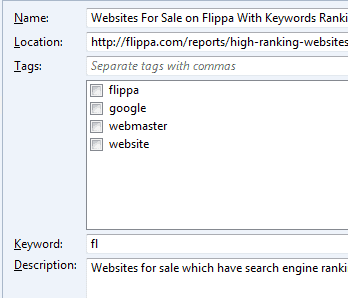
Keywords can be assigned to any site that you bookmark in the Firefox web browser. You may assign the keyword to the domain name if you bookmark it or for any other page on a site.
You cannot add the keyword directly when adding bookmarks either manually or through importing them but need to use the Library for that.
To add keywords to bookmarks in Firefox use the shortcut Ctrl-Shift-B or tap on the Alt-key and select Bookmarks > Show all bookmarks from the menu that opens. You need to select a bookmark and click on the more link afterward to display the keyword field here.
Just add any string to the keyword field to assign it to that particular bookmark. Note that Firefox won't check for conflicts and does not offer an interface that lists all bookmarks with keywords.
I suggest you use a two character standard for bookmarks unless you need to use only a few. You could assign a character to the type, e.g. s for search or t for technology, and the site name afterward using a single character or two characters.
Instead of accessing the website Ghacks by typing its URL, I simply type gh and hit enter after assigning the gh keyword to the bookmark.
The website loads just fine. Now, I do not recommend to add keywords for every bookmark that you have. This would surely lead to problems remembering the keywords for those urls unless you have a photographic memory.
I have about ten keywords for domains that I access regularly to speed up access. I do not add keywords for very short urls like cnn.com for instance but everything with 5+ chars makes sense. (it's enough to enter cnn for cnn to enter the website in Firefox because Firefox will automatically load the first website in the Google results if no matching keyword was found.
In classic Opera, you click on the Opera button and then on Bookmarks > manage bookmarks. Right-click a bookmark and select properties from the context menu. Here you find the nickname field that you can use to add your own personal keyword to the bookmark.
Closing Words
New Firefox users may not know about the keywords feature as it is not really advertised when you add bookmarks or load them. Unless these users read about it on sites like mine or stumble upon it in the bookmarks library, they won't know about it.



















hey watsz goodie
WOW! Awesome, I didn’t know about such simple way to make bookmarks work easier :)
Great, it works! Thanks, Martin!
I like firefox but sorta i dont like Opera
I don’t know about Firefox but Opera has even less known feature related to subject – you can set nicknames not only for separate bookmarks but for folders with bookmarks as well.
This way it’s easy to have nickname (or even interface button, it only doesn’t work with quick start – http:// is added which is ruining nickname) that opens set of sites at once.
PS custom search engines is totally awesome feature! :)
Roman yes you can do that. Five default keyword searches are available, they are “google”, “wp”, “dict”, “quote” and “slang”.
To add your own you need to bookmark the page with a search and replace the search string with the %s parameter. You can then use “keyword searchterm” to do the same in Firefox.
I mean shortcuts to searches. In Opera I can create shortcut for Wikipedia search, type in address string “w FireFox”, and jump to Wikipedia article about Firefox.
Can I somehow do this in Firefox?
Roman what d you mean by address string, typing in only part of the address ?
How about search via address string?
I used to it in Opera, but can’t find in FireFox.
This is a helpful hint, indeed. I used to do this very same thing. I found another option that was more useful for me, however.
I strongly recommend OpenDNS – aside from all its other benefits (content filtering, phishing protection, etc), it also does the very same thing as described in this post, and from any computer utilizing utilizing this service.
Check it out: http://opendns.com
almost completely unrelated, but google offers a browser synchronisation tool that you can install in firefox… i came across it this evening for first time! probably really old news to some people but this saved me a lot of hassle plus i dont have to ‘type a lot’ in google to find websites in my bookmarks on my home pc now (now synchronised with work pc it updates both!).
check here http://tools.google.com/firefox/browsersync/install.html