
Copy to Path Hidden Vista Feature

Microsoft likes to make things complicated from time to time it seems. When you right-click a file, folder or search result in Windows Vista you get the normal command menu with options to open, edit or print the marked objects. If you happen to press shift while right-clicking you will also notice that a new option has been added to the menu which is called Copy to Path.
Copy to Path adds a few new nice features to Windows Vista which are otherwise not available. If you right-click search results for instance while holding down the shift key you can export them into the clipboard and paste them afterwards in a text document.
You might also have noticed that dragging and dropping files or folders into the command line does not display their path the way you expected it to. Security concerns are the reason for the change according to Microsoft.
The workaround is the Copy to Path function. If you hold down the shift key while right-clicking a file or folder you can use the Copy to Path function to copy the path to the clipboard. Now simply paste it into the command line and you will notice that the path has been set correctly.
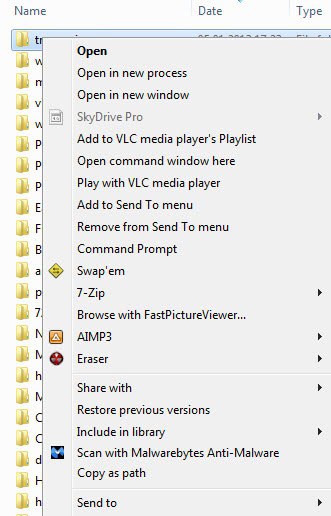
Please note that holding Shift may reveal additional context menu options that Microsoft hid away. On Windows 7, I get the option to open a command window here. While I'm not 100% certain that this is a default feature of Windows 7 and not added by a third party product, it can be useful at times if you need to quickly open the command prompt with the current path selected by default.
The copy to path feature is now know as copy as path in Windows 7 and newer versions of the operating system.
Advertisement













“Try to press ctrl and shift then right click in the menu. (some where with space) try under you’re account picture. and you will get a new option ! :D”
HAHA! What a great hidden feature :-P
Then you think you are computer nerd enough and then you see that you still learn some new things in windows :-P
Try to press ctrl and shift then right click in the menu. (some where with space) try under you’re account picture. and you will get a new option ! :D