
Open multiple links at once in Firefox

There are not many Firefox add-ons left that I have never heard about but this one caught me by surprise.
Snap Links is an excellent Firefox add-on that I have immediately added to the list of add-ons that are installed permanently on my system.
Its main feature is to provide a way to mark several links at once so that you can open them in one go in the Firefox web browser without having to click multiple times.
The default way of doing that is to draw a rectangle around them using the right-mouse button. Yes, that is all. Just click the right-mouse button, draw the rectangle around all the links that you want to open which will happen once you release the mouse button.
Want to open the first five search results in Google? Click no more than once. Just right-click the mouse button, draw the rectangle around all five result links and release it. Et voila, all five results are opened in new tabs.
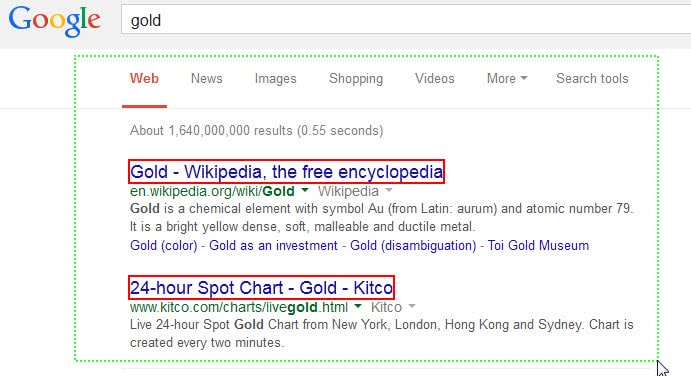
Only the main links, meaning links using the largest font size are selected by default. If you want to open all you need to press the shift-key. All links that will be opened are visualized by a red border.
The colors and many other settings can be changed in the add-on's options. You can change the drawing button from the right-mouse button to the middle or left one and open links in a new window / windows, bookmark links, download links or copy links to clipboard instead of opening them in a new tab.
I really like the bookmarking option the most. Very handy if you come upon a link list and have no time to check it out yet. Just bookmark all links in one go with this extension.
One of the things that I did change was to add a modifier key which I need to press when I want to use the extension's functionality. This made it more reliable on my system and prevented issues when I wanted to display the right-click menu but accidentally drew a rectangle instead on the screen.
Besides options to bookmark multiple links at once, it is also useful if you download multiple files regularly from single pages.
Update: Snap Links is not compatible with recent versions of Firefox. Use Multi Links instead which can still be used in all current versions of the browser.



















this is really great tool i use it and i feel really happy to use it.
this is the best mozilla add on EVER!! thanks so much for this guys
I used to use snap links but it stopped working. I just found out about Multi Links: https://addons.mozilla.org/en-US/firefox/addon/13494/ which has replaced it
And what about Linky? It does a similar job…
With the Mouse Gestures extension: Hold the right mouse button, hover all links you want to open, then do Right, Up, Left, and release the right button.