
Display all wireless network keys

Windows does not store wireless keys in a format that is readable by the human eye which becomes unfortunate when you have lost your key and want to access your wireless router. Without the key it is only possible to reset the router and create new keys which would mean lots of work. If you have router admin access you could change the wireless keys that are configured in the router to new values. But that would mean that you would have to have the right admin password in reach, which many users do not.
Wireless Key View recovers lost WEP and WPA keys in Windows XP or Windows Vista revealing the network, key type, key hex and ascii values. WPA keys are only shown as hex values which could mean that you have to convert them from hex to ascii to be able to use them. You can use any hex to ascii converter, like the one over at centricle.
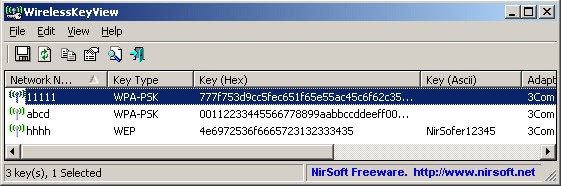
Once you start the application the table will be automatically filled with all keys found. Those keys can be exported in various formats such as html or text format. Please note that only those keys are revealed that have been created a Windows utility and not a third party software like one provided from your Internet Service Provider or modem / router manufacturer.
Another fantastic app by Nirsoft.
Update: You can copy the contents of a key to the clipboard. And while you may still need to convert it to Ascii to configure another device for wireless access, it saves you from having to change the wireless password in the router which would mean that you would have to change it on all devices that use the router to connect to the Internet.
Advertisement


















this program is show me just my own network
Thank you so much.I really need this application