
Shock Aero Task Switching for Windows XP, 2000 and 2003

One of the visual effects that was introduced by Microsoft in Windows Vista was the task switching effect that displays all open programs in a 3D environment.
The user of the system may then flip through all open windows in the environment to activate a program window.
Since windows are displayed as screenshots it is easy enough to distinguish between them which improves the selection process significantly.
If you like the effect but run a version of Windows that predates Windows Vista, you are out of luck if you are looking for a native function that replicates it. This means that your only option is third-party software like Shock Aero 3D which bring the functionality to older versions of the Windows operating system.
Shock Aero 3D brings Vista-like visual task-switching to Windows XP, Windows 200, Windows Server 2003 and even to Windows Vista.
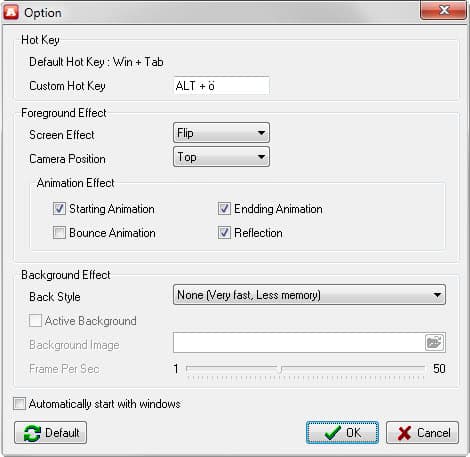
It is interesting to note that the program works under newer versions of Windows as well. We have tested it on Windows 7 for instance and it worked just as advertised on the system.
The program options displays several preferences that you can modify. For instance, you may change the default hot key to invoke the program's functionality, modify effects and styles, or change the camera position.
Please note that some effects and styles may impact the memory use of the application.
While I'm personally not a fan of visual task switching, this could certainly appeal to Windows users who like the functionality.
The program itself is offered as a portable version and installer. The program displays an icon in the system tray area on start that you use to access the options and to quit it again.
Previous versions of it required a serial key but that was removed in the most recent update dating back to 2008.
Verdict
It makes little sense to run the program on post-Vista versions of Windows as similar functionality is already available natively in those systems.
It may be worth a try though if you like to customize how the switching screen looks like or use a different hotkey to invoke the functionality.
Since the program runs fine on recent versions of Windows, you should not run into any compatibility issues either.





















Have post on http://mponteres.wordpress.com/2007/11/21/aero-3d-on-windows-xp/