
Windows Tip: Don't replace any files while copying

If you ever copied hundreds or even thousands of files from one folder to another with both folders containing files of the same name you might have realized that there is a button missing when transferring those files. Windows asks you what you would like to do when a duplicate file is found in the folder you are copying the selected files to.
Here you have the option to replace one or all by clicking on yes or yes to all options, no to not replace the individual file or cancel to stop the copying at this point of the process.
The option that is missing is of course selecting no to all, so that no files in the destination folder are replaced by files you copy in to it. So, if you do not want any file to be replaced in the destination folder by the copy process, you need to click on no every time a duplicate is found. Imagine if ten, fifty or more than a hundred duplicates are found. You'd have to click no all the time to block the new file replacing the old one in the destination folder.
You are now probably asking yourself if there is another option, one that makes the whole process a lot easier on the trigger finger. And yes, there is one, and it does not even require you to install third party software of any kind on the system.
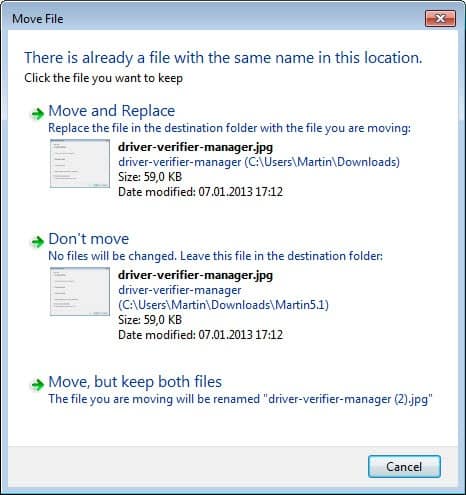
Microsoft seems to like hiding useful features in Windows. So, this is another one of those. Since there is no "No to all" button in the copy process one would assume there is no option to select that option. Turns out, there is an option. All you have to do is hold down the Shift key while you click on no. It has the same effect as saying No To All which means that the copy process from that moment on will automatically select no if a duplicate file is found in the destination directory.
So, next time you copy a large number of files in Windows and get duplicate file messages, you may want to hold down the Shift-key before you select the "don't copy or move" option from the selection menu.
















Hello,
I need a file manager that automatically checks entirely the destination folder, and compares the list of files in the destination folder with the list of files in the source folder, BEFORE starting the moving/copying.
Because Windows stops the transfer ONLY WHEN it finds a duplicate name, and waits stupidly for your decision (replace, skip or rename). Large transfers during the night (for example) are not possible if you don’t know if you have or don’t have duplicates : Windows might stop the transfer anytime, and nothing happens until you wake up and check your computer.
Thanks
:(
The best solution that I can suggest by using duplicate files deleter.
i sugestion u to use Duplicate file deleter its Don’t replace any files while copying and not effective
There is one more bug (?) in Explorer. Don’t do any file copy while drag and drop operation is in progress (eg. drag and drop files to extract from WinRAR), because Explorer won’t remember and can’t undo it. While it’s partially WinRAR’s fault, it’s also M$’s fault that they missed this problem. Obviously/probably file operations loggin isn’t multithreaded.
How about also having a “Replace file with the same name if older” button…and an”all” version of it? Maybe using the command line is more appropriate?
Uh. This is just another one of those little Windows annoyances that one quickly forgets about. Go install Ubuntu. Even if you do find some idiocrocy like a lack No To All button, you can file a bug in Launchpad (Ubuntu’s bug tracker).
Thanks a lot, i had to hold my pointer on “no” and kept clicking it before. and i felt we need “no to all” more. now u solved my problem. thanks :)
Nice tip, didn’t know about this “hidden feature”. Unlike many others, this particular one is really desired :)
Tech if you are working in a company network for example. When I was working for another company (working for my own now, hehe) I was not allowed to make any changes to the system.
Gotta love the sarcasm. Thanks for the great tip. Didn’t know that was possible.
Really? What restricts its usability in some environments?
Also I didn’t write this as a pointer to you exclusively but also to get other users to try it out. I have read some great additions to the tips you post in the comments so I figured if I can add something that might help other readers out I might as well do it.
Anyway I really like teracopy :)
Tech yes I’m using Teracopy already but some don’t use it or can’t use it in their environment.
Teracopy does this and it also has a “rename” and “rename all” button.
It supports queuing, pausing and resuming. It’s a great little program and can replace the normal windows copy-interface completely.
check it out here
http://www.chip.de/downloads/c1_downloads_28266187.html