
What is connecting to the Internet

If you want to find out which programs have established an Internet connection on your system you can use the software Procx for that. Procx is a process and module manager much like the well acclaimed Process Explorer from Sysinternals. One difference is that Procx is displaying a green icon next to each process or module if it has a connection to the Internet.
This is a great way to identify any process, program and module that is connecting to the Internet. These programs and processes can then be analyzed to determine if the Internet connection is needed and trustworthy or not. This should just take a few seconds for most processes listed there, we all know that Firefox and Opera need a Internet connection for example.
It becomes difficult if general processes have a Internet connection, svchost.exe for example. It's not clear if this is needed or not and it requires some research to find out. A quick research with Process Explorer revealed that this svchost.exe process was related to the RPC - Remote Procedure Call - service that is needed for Internet Connections.
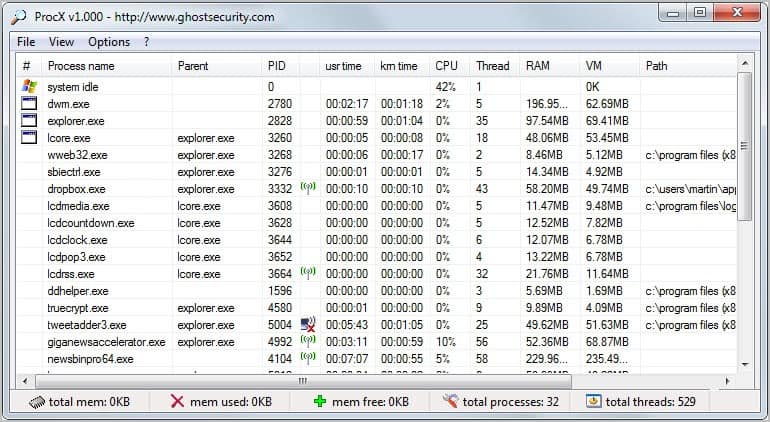
The best way to find out would be either perform a search for the process and find out if it needs an Internet connection . You could also just kill the process and see what happens but this could let to blue screens or other errors and is normally not advised.
Procx does not have to be installed and can be run from any location on your computer.
Update: The Procx website is no longer available and it seems that the program has been discontinued. I suggest you use Process Explorer instead which is linked above. You can alternatively download the latest version of (Download Removed) from our servers. We have uploaded the process manager there for your convenience.
If you want to find out which programs are connecting to the Internet, try CurrPorts as an alternative.
Advertisement



















I don’t see anywhere in the current v15.23 where that network column can be selected, which in your screen shot has no header name. Is it gone or am I not readily finding it? Thanks!
Another great find from ghacks! thanks!
I just made a post about svhost.exe and Process Explorer myself on my new blog, http://greasypc.blogspot.com . I also wanted to say, Martin, that I’ve since linked to your blog in it as a lot of my inspiration in tweaking my computer has been from sites like yours and LifeHacker. Thanks again!
ProcX seems a bit clunky. i.e. i can’t resize the window, only maximize, and scrolling when maximised makes the bottom status bar float in random places.
You can use NetLimiter Monitor (freeware) to see active connections and transfer rates.
http://www.netlimiter.com/download.php