
The Network Clipboard

I'm using a desktop PC and a Toshiba notebook at home, sometimes both at the same time which is the case when I write an article about Windows Vista, as it runs on the notebook only.
The desktop PC that I'm using is still runing Windows XP, and when I have to test Vista applications that are not compatible with XP or designed specifically for the new operating system, I have to switch to the laptop running vista instead.
Here I run the program, test it and create screenshots for the article that I'm about to publish on this website or another.
I do my research on the Windows XP PC however and find it convenient to use the clipboard across the network.
This means that I can do the research on my XP computer, copy a link to a website there and paste that link on the second computer to open the website in question.
I use the program Network Clipboard for that, as Windows does not ship with that functionality built-in.
The network clipboard works on Windows and Linux which means that you can share data between different operating systems as well which can be useful if you are running devices with Linux and Windows and want to share a clipboard between those devices.
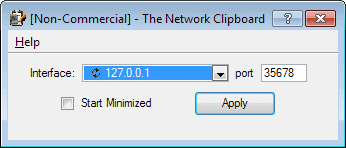
Usage could not be easier. Simply select a network interface and port and you are ready to go and use it. Windows users might have to download the runtime files which are also available at Sourceforge before they can install the Network Clipboard.
Since the program is portable, your best option is to place it alongside the library files in the same directory on your system to run it from there. Note that you do need to run it on both devices to get it to work properly.
Update: The program has not been updated since 2009 which is a strong indicator that it may have been abandoned by its developer. While it does work fine even on newer systems, you may want to use an alternative instead.
There are however alternatives available, even though they are not cross-platform. One of the better programs is Mouse without borders which not only shares a clipboard between machines but also the mouse and keyboard. To use the program you need to install it on all machines and share the security key so that all PCs can be shared using the software.
Advertisement













http://sourceforge.net/projects/clipboardmshare/ is multiplatform but you have to use a network share.
An alternative solution offering similar functionality is Ditto, which saves a history of your clipboard in a database and makes it searchable. It is open source as well, but only runs on Windows. It is available at http://ditto-cp.sourceforge.net/