
Prevent Malicious Software Removal Tool from phoning home

The Microsoft Windows Malicious Software Removal Tool is a security program provided by Microsoft that scans computer systems for dozens of common malicious applications. This tool was never meant to replace an existing virus scanner but it offers a quick and easy way to scan and remove popular worms and viruses from a computer system.
It does not offer realtime protection of a system, and it is highly recommended that you run another antivirus software on your system in addition to it.
Advanced users won't rely on this software from Microsoft at all but I suppose it could be useful for inexperienced users or as an additional means of protection. There is however one "feature" that cannot be turned off by normal means. The Malicious Software Removal Tool reports back to a Microsoft server whenever it finishes a scan of the system.
The only way to turn off this option is to create a new Registry key. Open your Registry first, click on Start, Run and type registry in the box. Hit enter and the Registry should appear.
Now navigate to the Registry key HKEY_LOCAL_MACHINE\SOFTWARE\Policies\Microsoft\MRT and check if it contains a Dword named DontReportInfectionInformation.
If this is not the case you can add it. Right-click the right pane and select New > Dword from the menu. Enter the string DontReportInfectionInformation as the name of the Dword. Double-click it afterwards and set the value of it to 1.
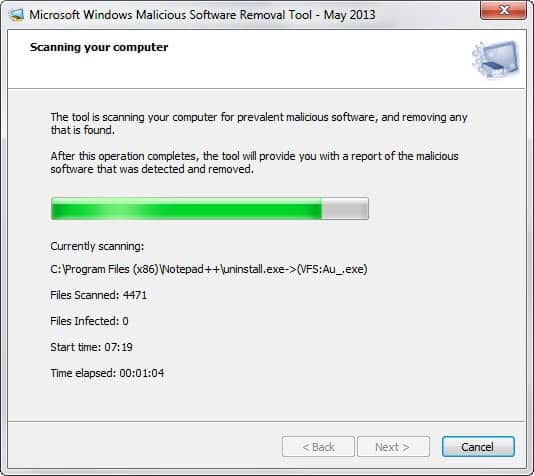
This ensures that the Malicious Software Removal Tool will not report back to Microsoft whenever a scan of the PC finishes.
Update: The program is now a standalone application that is not installed anymore. Since this is the case, it does not add entries to the Windows Registry anymore. One option that you may have to prevent it from phoning home is to block its Internet connections using your firewall.
Just create a new rule in the firewall that blocks the tool from making any outbound connections. To do so tap on the Windows-key, type firewall and hit enter. Select Outbound connections and click on "new rule" on the page that opens up.
Select Program under Rule Type, then the executable file of the Malicious Software Removal Tool in the next step, and in the next step "block the connection". Click next again, add a name for the rule and click finish to save the new firewall rule.
















The microsoft site says the entry name is
\DontReportInfectionInformation
Does the backslash have to be included to work? Does the entry work with or without the backslash? There are other entries in the registry that start with a backslash.
I would use it exactly how Microsoft has written it down on their website. When in doubt, create two entries so that you have both options covered. Or, simply block the program in the firewall.
Thanks for the Win7 reg key. One less Phone-Home annoyance for me.
Thanks – Now we know why our profile was stuffed every month.
On a Windows 7 Pro System, the Registry Path is:
HKEY_LOCAL_MACHINE\SOFTWARE\Policies\Microsoft\RemovalTools\MRT
For those running Vista x64 this entry is in:
HKEY_LOCAL_MACHINE\SOFTWARE\Wow6432Node\Microsoft\RemovalTools\MRT
Hope this helps.
The tool runs once a month after download – usually the on 1st login after the 2nd Tuesday. However, it will sometimes corrupt Windows profiles if a login occurs before it is finished scanning.
It does not get installed on the computer. It just runs and deletes itself. New versions are released monthly – if new virus signatures have been added. New releases are cumulative and contain all the signatures from previous versions.
The program is JUNK and uneeded if you have a good anti-virus program. It caused us to disable Windows updates while we searched for why our users were losing their Outlook settings.
More information: http://support.microsoft.com/?kbid=890830
Download Information: http://www.microsoft.com/downloads/details.aspx?FamilyId=AD724AE0-E72D-4F54-9AB3-75B8EB148356&displaylang=en&displaylang=en
From Microsft KB890830:
“A user may log on to a computer while the Windows Malicious Software Removal Tool is running in the background. (The tool may be running as part of a deployment that uses Windows Server Update Services.) In this case, Windows may inform the user that the current user profile is corrupted and that a new profile is being created. To resolve this issue, the new profile can be removed. The user can logon to the system again at a time when the tool is not running. This issue is most likely to occur on a Windows 2000-based computer.”
Hmm I don’t have it on any of my computers either..
XP tablet
XP pro
XP home
I have the tool installed, last updated…
Windows XP Windows Malicious Software Removal Tool – December 2007 (KB890830) Wednesday, December 12, 2007 Microsoft Update
where did you find this at Martin?
I know i install it every time and i don’t have it either. doesn’t it remove itself after it finishes with it’s scan?
HKEY_LOCAL_MACHINE\SOFTWARE\Policies\Microsoft\MRT
does not exist in my registry…i know i installed the malicious software removal tool update. could MRT be located elsewhere?
MS is an evil corporation that wants your firstborn ….lol
Because you don’t know what data the program sends to Microsoft ? Because Microsoft did not include such an option in the program ? Because you think it is your right to decide if you want to send a report to Microsoft ?
Why do I care if the tool reports back to MS? Too much paranoia methinks!