
Reveal Passwords behind asterisks in Internet Explorer

What was the password again for that website? I bet you have asked that question numerous times, I know that I did. I'm not that good at remembering passwords and it happens that one slips under the radar and I have troubles remembering it. This is not such a huge problem in Firefox with its Password Manager that reveals all passwords that you have saved before but it could be one in Internet Explorer.
The Internet Explorer does not have a password manager equivalent which means that you are left to guess what the password behind those asterisks is. You might need the password if you want to create a pop3 account for Gmail in your favorite mail software which requires the Gmail password for example, or simply because you need to enter it in another application or browser.
AsterWin is a small software by one of my favorite developers Nirsoft. The utility will scan all open Internet Explorer windows and reveal the password behind the asterisks. This works if the password is stored on the computer and displayed once you visit the site or enter the username.
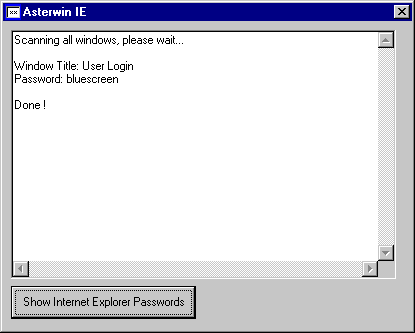
Here is how it works in detail. You open Internet Explorer and visit the website where the login information are automatically filled out on. When you are on the site, run the Nirsoft program and click on the show Internet Explorer passwords button. The application will then scan all open Internet Explorer windows and tabs for passwords to display them in its window afterwards.
Note that some antivirus programs may flag this application as malicious. I can assure you that it is not malicious. The program should work on all versions of Windows and Internet Explorer. If you can't get it to work, try IE PassView instead which will work with newer versions of Internet Explorer.
Advertisement



















