
Search in all Filetypes in Windows when using Windows Search

The native Windows XP search functionality can search for file contents and not only for file names, but will only search registered file types by default. This is however limited to a selection of file types by default which may be too limiting for your taste.
The search ignores file types that are not registered for example and won't search in many plain text file types such as php, css or html files even though it is theoretically not a problem to do so if those are not registered.
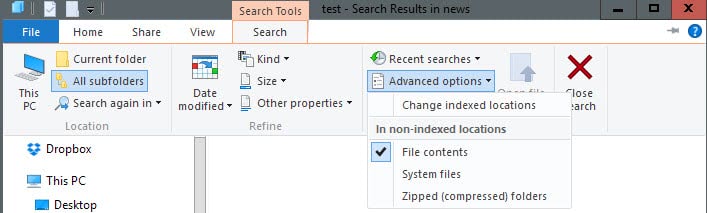
Update: The preference discussed below is only available in versions of Windows prior to Windows 8. Microsoft removed the option in Windows 8 and later versions of the operating system. Microsoft recommends to use Windows Search instead for that. To have Windows search in file contents on Windows 8 and newer, select the Search tab in Windows Explorer after the initial search, and there Advanced Options > File Contents.
Here is a quick Registry hack that enables searching in all file types and not only a select few that Microsoft has enabled by default.
- Open your Registry with the keyboard shortcut Windows-R.
- Type regedit and hit the enter key.
- Navigate to the Registry key HKEY_LOCAL_MACHINE \SYSTEM\CurrentControlSet\Control\ContentIndex and double-click the entry FilterFilesWithUnknownExtensions.
- The default value of this entry is 0 which means that Windows will not search in unknown file extensions.
Set it to 1 to make the search more universal. Changes take effect immediately and Windows will from then on search all file types and not only those registered on the system This includes php and htm files for example which Windows does not search in by default.
You can restore the original functionality at any time by changing the value back to 0 again in the Windows Registry.
Please note that Microsoft has changed how search is working in Windows Vista. The tip because of that is only working for Windows XP systems and not for newer versions of the Windows operating system.
Vista's search -- and the search of newer versions of Windows -- uses filters to add content search support of specific file types to the search functionality.
You find a list of new search filters for newer versions of Windows here.

















would love to know how to rebuild filetypes in winexplorer, I keep making changes, but they never take.
GRrrrr
Smart and easy, thanks.