
Configure Window and Mouse behavior with Pitaschio

I seldom come upon a software that is small and packed with so many useful features that should have been integrated in Windows in the first place. What I really do not understand is that Microsoft does not seem to look at those applications and put the most thought after functionality into the next version of Windows.
Pitaschio is a small software that can be run from any location. It lets you configure windows and mouse behavior to an extent that even the nerdiest nerd should be satisfied with. Most of the settings can be altered in two windows. The first window has so many options that is is problematic to find words that describe it.
It lets you disable several keys and functions in Windows like disabling the minimize, maximize and close button of every window, disabling keys like the Windows or Caps Lock key but also other settings like transparency settings for windows, aligning windows to the grid automatically or controlling the volume with the mouse wheel.
- Allow snap.
- Allow snap from within.
- Place window only in screen.
- Adjust transparency by wheel.
- Minize to system tray.
- Disable minimize, maximize, or close button.
- Advanced size changing.
- Align to grid automatically.
- Use small icons.
- Transparent icon background.
- Icon text color.
- Volume control by wheel.
- Send mouse wheel changes to under-cursor-window.
- Don't show system tray icon.
- Lock the taskbar.
- Virtual desktop.
- Disable keys: Windows, Insert, Alt, Kanji, Menu, F1, Caps Lock, Kana
- Parent folder by double-click in Explorer.
- Allow extended rename.
- Display volume.
- Support software laser pointer.
The second configuration window deals with mouse shortcuts. I have never seen such a vast amount of mouse shortcuts in my life before. First of all, behavior can be configured differently depending on the mouse location and activity.
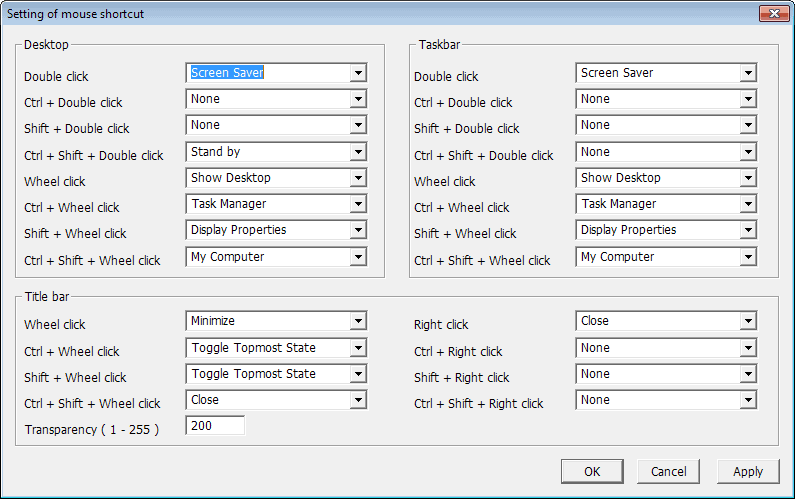
- Define actions for double and wheel clicks as well as Ctrl, Shift or Ctrl+Shift clicks on the desktop.
- Define wheel clicks and right-clicks, as well as ctrl, shift, or ctrl-shift clicks on the title bar.
- Define double and wheel clicks on the taskbar.
The program supports a lot of actions. From changing the system's power state and opening the task manager to changing windows states with title bar clicks to opening the command prompt or muting the volume.
By default a wheel click on the desktop displays the desktop minimizing all windows while a wheel click on the title bar of a window minimizes it. This behavior can be altered to suit your needs.
I decided for instance to swap the action of a wheel click and a right-click on a title bar. A right-click closes the window normally while a wheel-click minimizes it. I do minimize windows more often which is why I swapped those.
Other possibilities given are opening the command prompt, the control panel, my computer, turning off the computer, safely remove and about 20 more.
Combinations of mouse clicks and shortcuts extend this further which means you can add eight actions totally for the areas Desktop, Taskbar and Title Bar. (normal mouse click, CTRL, SHIFT and CTRL + SHIFT clicks).
Make sure you download version 2.26 of the program and not the most recent 2.27 version, as it ships with an English interface while the newer version does not.
Advertisement



















This is a MOST EXCELLENT program!
Grandiose. Everybody should at least try it!