
Make use of Opera's chameleonic features

As a proud Opera user, you probably let your browser identify itself as Opera browser by default. Although most websites do work and display more or less properly in Opera, there are still many of them which don't comply with the standards and contain many non-standardized code segments (usually working in IE only) thus confusing the standards-based browsers which leads to improper appearance of the site in the end.
Fortunately, Opera is clever enough to handle this in most cases by applying a disguise against the web server, it just needs to be triggered the right way. To make it identify as another browser however, you need to press F12 and go to "Network" tab in the "Site preferences" menu first and select "Identify as Opera (IE, Firefox)", which is rather impractical. How lucky we are to have another, much simpler solution to this.
The solution starts with enabling the Status bar through View > Toolbars menu if you haven't done so earlier. After that, either press Shift + F12 or select Customize after right-clicking the Status bar (at the bottom of the screen) to get to the Appearance window and then choose Buttons tab in the opened window.
After selecting the Status category, you'll see "Identify as" button among several others. Drag this button, drop it over your Status bar, align it anywhere you want and don't forget to confirm the actions by clicking OK in the Appearance window. Since now, you can switch your browsers identification by a single click on the "Identify as" button sitting in Status bar. Simple enough, huh?
Of course, thanks to Opera's flexibility, you can locate this or any other button (Clock, Progress bar) to a different place besides Status bar. Yet, Status bar appears to be the best place for it.
Update: Please note that the method described above is only working if you are running a version of Opera prior to 15. The company has switched browser engines and as a consequence, much of what is supported in previous versions is not anymore.
You can change the user agent in newer versions of Opera, but only if you install a browser extension such as User-Agent Switcher first.
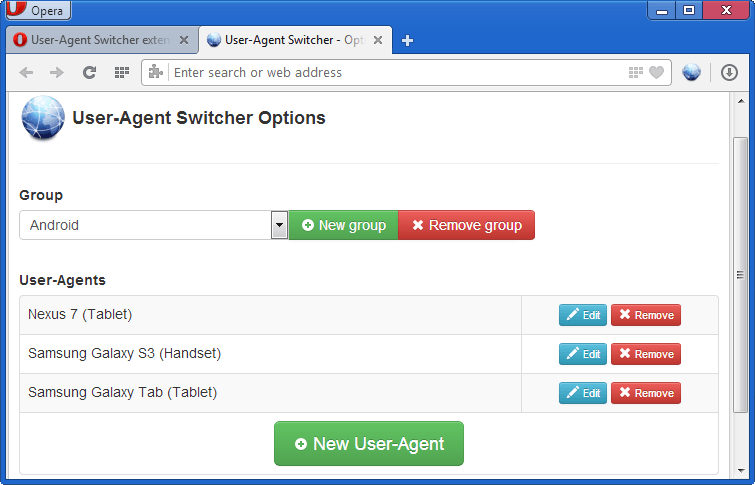
The extension ships with a great selection of user-agents sorted into groups. Just right-click on any page you are on and use the User-Agent Switcher menu to change the current user agent to another one.
You can alternatively use the toolbar button that is added during installation. If a user agent is missing, add a new one in the options.













@ carlos bastidas:
There are numerous complaints about Googles upgraded service as I see from my few-second investigation. Some users declare positive results with Opera, bad with Fox and others vice versa. So that it seems to only work reliably with IE so far.. ? You may want to try switching Opera’s identification to Fox or check
http://groups.google.com
to resolve the problem.
Cheers
Martin:
As much as I love Opera and have been an enthusiatical fan for some time. I don’t use it mayself because Google Reader and GMail are really slow on Opera but they run pretty well in Firefox. Any hack on mind?
Thank You
Solves an irritating problem I’ve had for awhile