
Thunderbird Tip: How to archive old messages

I had lots of messages in my Thunderbird mail accounts. More than 1200 send messages and more than 1500 incoming message. The send messages alone had a size of more than 25 Megabytes while the incoming messages a combined size of more than 800 Megabytes.
I made the decision to archive old messages to free up disk space, and maybe also improve the performance of the email client in the process.
The best way in my opinion is to archive all old messages that I do not need anymore and remove them from Thunderbird completely. After thinking about the how-to for a while I found a method that works perfectly.
Thunderbird creates so called mail folders in its profile folder. Inside those mail folders are files without an extension and msf files of the same name.
The idea was to create a new folder, name it accordingly and move it out of the Thunderbird profile folder. I created a folder sent-071101 and moved all sent mails into the folder that were older than one month. This can be done by simply dragging and dropping mails into the new folder.
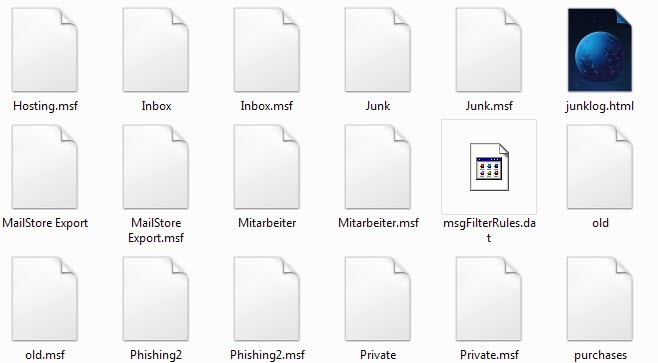
After doing that you close Thunderbird and go to the profile folder, normally located in the Application Data of the Documents & Settings folder.
I did create a new folder mail-backups and moved the files sent-071101 and sent-071101.msf into it. The mails that have been moved into that folders are not shown in Thunderbird anymore. I simply proceeded with other mails that I did want to archive and repeated the process again.
This is also an excellent way of backing up your emails regularly. Just copy all those files from the mail folders to another location or burn those to DVD or CD.
Finding the Thunderbird profile folder:
The Thunderbird profile folder is by default located at C:\Documents and Settings\van dread\Application Data\Thunderbird\Profiles\XXXXXX.default\Mail\
In newer versions of Thunderbird, you can select Help > Troubleshooting Information > Show Folder to have the folder opened for you on your system which should speed things up a bit.
Update: You can alternatively use a software program to archive emails in Thunderbird to speed up the mail client.
While the manual method works fine, you may want to use the email backup software instead. There are some reasons for that. A core reason is that you can still access all those backed up emails, and also search them. You cannot do so when you use the manual method.
Other options include that you do not end up with new files whenever you decide to create an archive of old messages, as everything is contained in one program instead.
Advertisement



















This is a fantastic way of archiving, great stuff.
You can try Mail Viewer.
You can open-view any Outlook Express, Windows Mail/Windows Live Mail and Mozilla Thunderbird message databases as well as single EML files.
It’s portable, that means no installation.
http://www.mitec.cz/mailview.html
Now I’m confused; Mitch, do you support my view or do you disagree :-?
But you are right; I do many thing as I did before 2001. Some thinks loose their value (like the MicroVAX on which I read my first e-mails, or vi with which I edited my first e-mails) but others don’t (like Drag&Drop and the KISS principle: Keep It Simple and Stupid).
In 1999 I started archiving my mails als .eml as the best compromize; They are now (password protected) on a Web-Server, with full-text search through recoll, on my laptop, and also on my Smartphone, with automatic sync.
I have lost the older mails, because I relied on something advanced for which the programming gurus at “digital” around VAX/VMS had got their act together to develop something really good exactly to do what was mentioned here AUTOMATICALLY…
I want my archived mails to last longer than short-lived technologies like VAX/VMS, the IMAP protocol, the .msf and .eml file formats, Thunderbird, MS Windows, or silicon-based computers.
/* Though, even a dummy could make backups then… */
Correct but, why do we develop and develop and develop and call ourselves all ‘brain sugeonetic extreme experts with 26,7 PHDs and then fall back to what we already did last century?
oh – “surgeonetic” – I just made this word up in the hope it’ll get accepted into the dictionary … ;-)
There is one logical way to archive e-mails:
http://www.howtodothings.com/computers/a2431-how-to-archive-emails.html
Only that you have to “download message bodys” manually. However, does not work on Thunderbird :-(
Even more progressive: why not store each mail locally as a file system folder, with a “main.txt” inside, together with the attachments as simple files? Though, even a dummy could make backups then…
*** MARTIN ***
Thanks for the tip here
I addressed this already here https://www.ghacks.net/2009/02/07/thunderbird-archiving-shortcuts/ before reading your post .
Question is – WHY can’t the developers around Thunderbird get their act together to develop something really good. Something that would exactly do what you mentioned here (I found our after digging around in these folders, too… to mention is that you first need to activate “show hidden files) – AUTOMATICALLY.
But instead of doing so, this would make life a little easier for the normal folk they would never have a clue what to do, the programming gurus come up with a useless “archiving” extension and so much other crap, simply duplicating and triplicating things they are already there.
Do they really have it necessary to get their mark this way?
Instead of refining and improving … we just add something new and another one new thing and now we work with a million things and never know what really!
Something to think about
Why not just use Outlook? Well, because it *doesn’t* make life easier — you can only have 20-some odd filtering rules and that’s just not enough to automatically maintain an active mailbox
Thanks for good article.
Why won’t people just use Outlook and make your lives simpler.
One option is to use a free online server. I use Inbox.com which offers a staggering 5gb free storage space. To use it, I create an Inbox.com account such as
Johnssentemails@inbox.com
Then I use Thunderbird to send an automatic bcc copy of every email I write to that Inbox.com address.
I do this in Thunderbird by going to
Tools – Account settings – Copies and folders – [X] bcc these email addresses Johnssentemails@inbox.com
You do need to log in to the inbox account from time to time to show it is active, but this works well for me.
Thank’s Martin, I downloaded TB portable which may work perfectly if I could get it to show my profile and mail – it may be that I have to enter the Pop/account info manually before the mail directories will show. It refers to using an ini file which is different depending on where you get the sample ini file from. I will keep trying.
Nigel well you can simply open them in a text editor and view them that way. I would have to do some research otherwise. Maybe a portable email client that would be put on the DVD with the emails could be a solution.
I would like to archive TB emails to DVD and be able to view/lookup emails in the archive directly without using Thunderbird. Any thoughts?
I was cut off by the timer……..
…. “that give us the option.” Why….. is there a timer……
Doesn’t it seem a bit stupid to store seperate emails inside a proprietary archive when there’s a perfectly good file system sitting outside it? I’ve been looking all over for a way to store email messages as seperate files for file-synchronizing between computers, or even for linking to them from events and tasks in organizer software. Okay, so there wouldn’t be compression (necessarily), but I don’t need it. And encryption is taken care of by Truecrypt. And as far as I know, there are no email clients in existence for Windows that gives us the option. None!
Is it possible with Thunderbird to archive certain mails contained in a directory and view them afterwards. I do not want to archive the mails inside the existing Thunderbird setup but I will copy them in a DVD, for example. Can I access them as and when required with Thunderbird in future?
To put it more concretely, suppose I have an email account now which I want to discard but keep a copy of the mails. I need to make a backup of those mails in such a way that Thunderbird can read them in future, if required. Please note that from now on I will be using a new email account and Thunderbird would be configured with the new email account.
I know the technique of copying the files in the “xxxxxxx.default†folder but in such a case the entire profile is copied and for my case I will again get my old profile (for the OLD email account) back but I will loose my new profile (for the NEW email account) !!
All the archive answers are interesting but…
I need a way to view/search these archived messages at a later date without switching files and profiles etc.
Ideally a way to open an “external” source under the “folders” directory window.
Any suggestions?
Mike
“The idea was to create a new folder, name it accordingly and move it out of the Thunderbird profile folder. I created a folder sent-071101 and moved all sent mails into the folder that were older than one month. This can be done by simply dragging and dropping those mails into the new folder.”
There is a quicker way to do this. Close Thunderbird first. Then go to the profile folder on your computer and sipmly rename the folder called “Sent” to “sent-071101” or whatever you want. You can then move the renamed folder somewhere else if you want to, or if you leave it in the profile folder, it will show up as a new folder when you restart Thunderbird.
When you restart Thunderbird, it will create an empty Sent folder automatically. (This works for all the standard Thunderbird folders.)
Hi guys,
Apologies to bring this back a level. How do you configure T-bird to re-access the archives once they have been made? I had a prob with T-bird, installed again. Now I can’t view past mails, despite them being “archived” in the original profile folder.
Cheers
> Well you can basically use any backup software that you like and
> just schedule the backup of the complete profile folder.
Yeah, but ideally, there’d be truly separate “modules” (I believe Outlook allows you to create separate files for archiving – but I despise Outlook, so I wouldn’t know for sure).
As for the extension: I’d love to see someone taking over, perfecting the code. (I’m not too good with Mozilla extensions… )
Well you can basically use any backup software that you like and just schedule the backup of the complete profile folder.
I will take a look at the extension tomorrow. Thanks for posting that.
I’m also still looking for a good way of archiving Thunderbird messages externally (other than using MozBackup).
A while ago I’d created an extension to help me keep my inbox(es) clean:
One-Click Archiver: archiving mails to correct sub-folders
I haven’t had the inclination to perfect the code, but it’s been doing wonders for me, for almost a year now.