
Is it safe to delete $NtUninstall files?

If you have browsed the Windows directory on your Windows XP machine with hidden operating system files displayed, you may have noticed several or maybe even a lot of files started with the string $NtUninstall. Maybe you asked yourself the question if it is save to delete those files. Those $NtUninstall are created whenever you install a new service pack or patch from Microsoft. Most folders end with KBxxxxxx which relate to the corresponding Knowledge Base article that references the update.
The only negative effect of deleting those folders in your Windows directory is that you will not be able to uninstall those Microsoft updates anymore. While most users could without doubt delete those $NtUninstall folders some may want to create a backup first before they remove the files from the Windows directory.
Instead of just deleting the folders you could back them up to CD or DVD first before you do so. This ensures that you have access to the backups should the need arise, for instance if you need to uninstall an update or patch because it is not working correctly on your system.
My main recommendation is that you do not remove $NtUninstall files younger than two or three months. If you only remove older files, you will still free up disk space on your system but with the added benefit that you used your system for several months without issues.
A quick check revealed that all $NtUninstall folders used roughly 200 Megabytes on my hard drive in compressed state. I personally feel that this is a bit too much and decided to delete those folders. I really can't think of a situation why I wanted to uninstall a Microsoft update that I installed a while ago.
Note that leftovers remain in the Windows Registry if you delete the files manually. To remove those as well, do the following before you delete the folders:
- Use Windows-R to bring up the run box of the operating system.
- Type regedit and hit enter to load the Registry Editor.
- Navigate to the key HKEY_LOCAL_MACHINE\SOFTWARE\Microsoft\Windows\CurrentVersion\Uninstall using the structure on the left.
- This displays all system-wide updates including all Windows patches installed.
- You need to click on each individual item and note the items URLInfoAbout value which displays the Knowledgebase ID.
- Delete all entries here that have matching IDs.
There is a second option which is by far the better option in most cases. You can run the Disk Cleanup Tool to remove old patches from your system to free up space.
- Press the Windows-key.
- Type Disk Cleanup and select the result.
- Select the c: drive when the drive prompt is displayed.
- Select the clean up system files button. This restarts the application.
- Select the c: drive again.
- Make sure Windows Update Cleanup is selected.
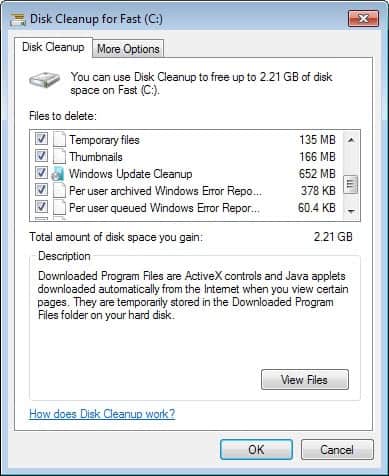
Click on the ok button to start the process. As you can see, Windows may be able to free lots of storage on the system.
















Thanks for the information. I thought that’s a virus file. :). Thanks!
In fact, these folders are also created when Automatic Updates install, NOT only if you install a patch manually.
These folders occupy several gigabytes on my drive and I’ll now delete them ;)
I hope its safe. if not, i will trouble because delete so many files..