
Convert DVDs with Handbrake

I don't like to take my purchased movie DVDs with me when I travel but still love to have some of my favorite or new movies with me in case I would like to watch a movie on my notebook.
I could of course burn those DVDs and take the backups with me but this is not ideal in my opinion. I do not like to carry any media with me when traveling and prefer to have the videos on the notebook in digital format as they don't have to carry them around and be careful not to break them.
A far better solution - at least for me - is to convert DVD movies and put them on the hard disk of my notebook. Compressed movies usually have a size of 700 Megabytes to 1.4 Gigabytes which means that my laptop can store several movies without facing storage problems.
Another benefit of the procedure is that it resolves the problem of not having access to a DVD drive anymore as many modern laptops and devices come without optical drives. While you could buy an external DVD drive for your computer, that would mean having to carry it around with you as well.
Handbrake
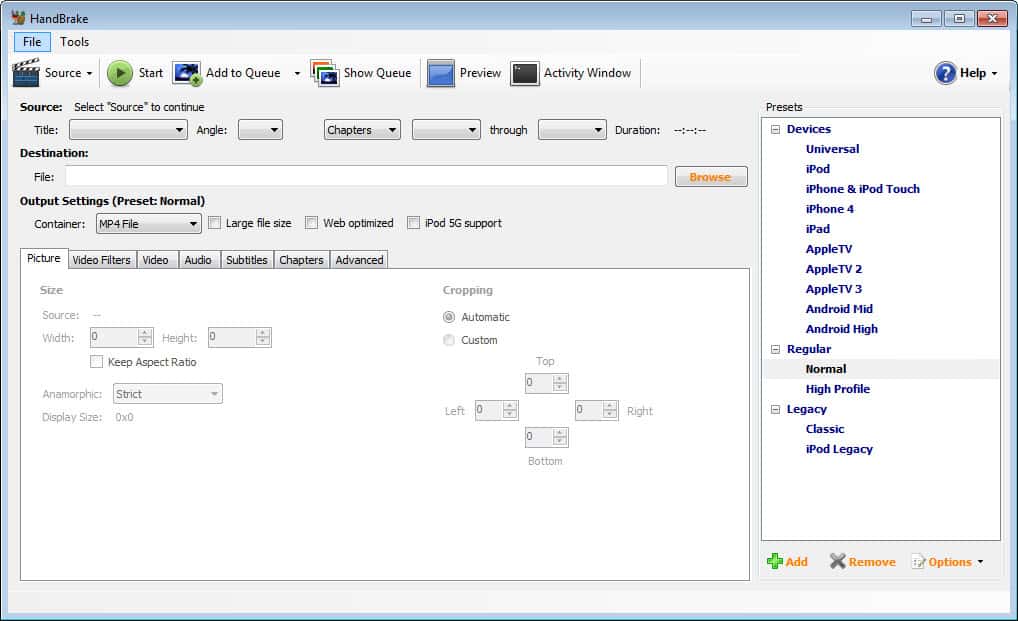
Handbrake is open source software that you may use to convert video DVDs to digital formats so that you may play them on the computer.
All you need for that is access to a Video_TS folder. This is the folder that is on every movie DVD but you may have it on your hard drive as well. It is possible to select a preset output like Ipod High-Rez or Apple TV, or keep the default one which is simply called Regular > Normal.
You may have to run some tests to find the best preset for your use case and may create a custom preset as well if none of the available presets meets your requirements.
You need access to the Video_TS folder, select a directory and name for the output and click on Encode Video to start the DVD conversion. That's the best case scenario, and you end up with a digital version of the movie or show on the computer's hard drive in the end.
You may modify settings to change the quality of the output video. Options include raising the bitrate or changing the default framerate of the video.
You may queue conversions with Handbrake which is handy if you need to convert multiple DVDs to digital video format. To use the queue system, either copy all Video_TS folders of all DVDs that you want to convert to the PCs hard drive for automatic conversion of all movies or shows, or swap discs whenever DVD conversions complete.
One should note that Handbrake is not able to convert copy protected DVDs. This means that you would need a different software to copy the contents of the movie DVD to your hard drive (and remove the copy protection) before you can convert the movie further if the DVD is copy protected.
One software that can do this is DVD Fab HD Decrypter. Handbrake is available for Microsoft Windows Apple Macintosh and Linux.
Closing Words
Handbrake is an easy to use cross-platform program to turn video DVDs into digital videos that you can play on any device. The video converter supports presets to convert to specific formats with just a few clicks and an option to create custom presets for better customization.
The interface may look a bit intimidating on first glance as it features lots of tabs and options. If you select a preset, you can ignore most of those options unless you want to customize the output before you hit the "start encode" button.
Handbrake updates


















The main problem I have run into is that it takes a long time to run. Do you recall how long it? What was the running time for the original movie? Thx, J