
Edit the Send To Menu

I have never really used the Send To menu in Windows Explore as I could not come up with a good enough purpose for it. Sure, you can make use of it to send files to a new blank email or another location, but all of that is also possible without the Send To menu.
Manipulating the options provided by the menu is a rather complicated process, and so it is usually recommended to use third party software to modify what the Send To menu displays, and what it does not.
Send to Toys is a program that lets you add or remove entries from Windows' Send To menu. You can for instance use it to remove items that you never use, or add items that you want to make use of in the future. The idea here is to customize the Send To menu after your liking to streamline it and make it more accessible at the same time.
When you first install the application on your system you have the option to run the installation with default settings or custom settings. I highly suggest you pick custom settings here as you can uncheck items from being installed that you do not plan to use at all.
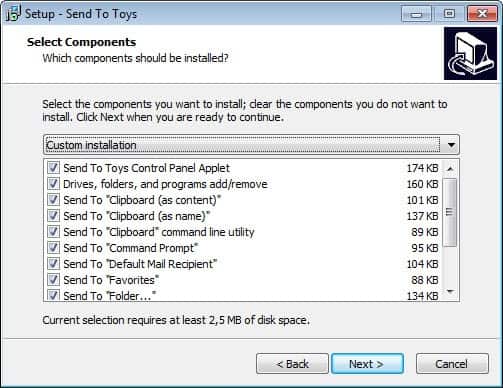
As you can see on the screenshot above, Sent To Toys may install several new options for Windows' Send To menu including sending data to the clipboard, command prompt or favorites.
You can run the program right after installation. It displays the Send To menu options available on the system in its interface and it is up to you to remove any item that you do not want displayed in the menu. You can furthermore add custom files, folders or programs to the menu which may be useful if you often move or copy files to another folder or program on your system.
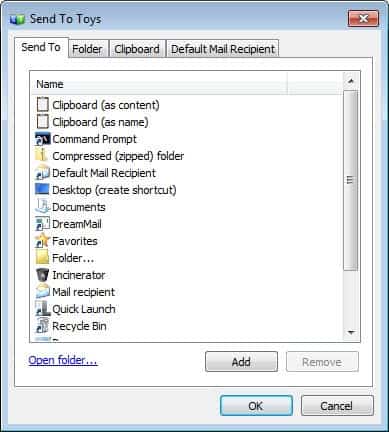
The folder, clipboard and default mail recipient tab list additional configuration options that you can make use of. This includes for instance how and which information are copied to the clipboard if the option is selected, or if you want to copy or move files if you select a folder in the send to menu.
The program is compatible with all recent versions of the Windows operating system including Windows 10 which has been released a couple of months ago.
Closing Words
If you are using the Send To context menu in Windows Explorer regularly, you may find the options provided by Send To Toys useful as it may help you remove Send To items you never use or add items that you would use if they would exist.




















I have used Moon Software’s FileTarget for years now. Its for copying and moving files.
BTW: You can place many, many Links in the SendTo Folder e.g. to go Defrag or to Waveditor or Un/Register multiple DLLs & OCX once (%windir%\system32\regsvr32.exe /u) or MP3Directcut or MP3Merger blabla… and so on.
You be able to send selected Folders or Mediafiles once to Programs :)
Another simple Way: Send to “SendTo”
Go to the “SendoTo” – Folder rigthtclick it and Create a Link from it, and place this Link in the “SendTo” Folder. From Now You have a Send to -> “SendTo” Option – I use this for Years, and it works fine for me :-)