
Check MD5 Hashes

MD5 (Message-Digest algorithm 5) is used for a variety of purposes, but most often to compare the hash of a file or string at two different points in time. You can for instance make use of it to find out if files on a system have been modified, or if a password that a user enters matches the password stored in the database without knowing the password.
To put it simple, it works like a fingerprint. So, nowadays most websites add MD5 information to their program downloads so that users can verify the checksum after the download.
Update: MD5 and SHA1 are not considered secure anymore. We suggest you use a different algorithm when computing hashes for verification.
It would obviously be better to use two different sources, one for the download of the file and another for the hash, as a hacked site can easily be manipulated to display the hash of a manipulated file instead of the correct hash. Still, in most cases, it works out rather nicely.
MD5 Checker
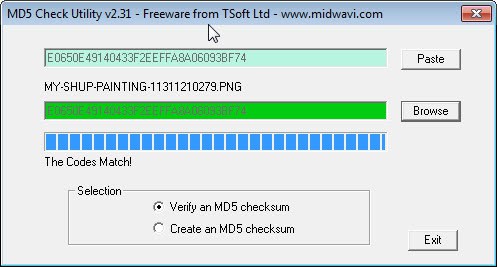
We can use the portable program MD5 checker to compute and verify the MD5 hash of files that we load into the program. You can use it to create MD5 checksums, and to compare a checksum that you already have with the checksum of a file that you select.
Use is a bit complicated but still easy enough in the end. To verify a checksum copy the existing hash that you have and click on the paste button in the program window. This pastes the hash into it so that it can be used for the comparison.
You then click on browse and pick the file that you want to verify from your local hard drive. The program will tell you if the codes match or not. To create a MD5 checksum you need to switch to that option under selection, and use the browse button again to select a local file.
The program copies the hash to the clipboard automatically so that you can use it right away. This can be an interesting option to verify that a backup is not corrupt. Just create hashes for all files that you backup during that time, and check the hashes again regularly on the backup medium to make sure they match up.
Update: The developer website is no longer available, and it appears that MD5 Check Utility has been abandoned as well. We have uploaded the latest working version of the program for Windows to our own server.
Note that we have done so for archiving purposes only, and that we don't support the program in any way. You can download it with a click on the following link: (Download Removed)


















BEST APP