
Show message count of all folders in Thunderbird

Thunderbird displays only the message count of unread mails of every folder by default. I tried to find a way to display the count of all messages instead which would help me get an overview of the amount of mails stored inside a folder.
I wanted to make sure that the unread messages number would still be shown as well. Showing both the read and unread email count can be done in Thunderbird, read out to find out how.
Update 3: As of Thunderbird 60, the option was moved again. Select Hamburger Menu > Options > Layout and check "Folder Pane Columns" to display the message count. End
The option to activate the message count for all mails is kinda hidden in Thunderbird. You need to enable the "Show Expanded Columns" option first which can be done by going to Tools > Options, selecting the Advanced tab and checking "Show Expanded Columns in the Folder Pane".
When that is done click on the small icon next to Name in the folder pane and select total from the drop down menu. Once that is done you see the total amount of mails that are currently in the folder. It does however not display the number of mails that are in sub folders unless you expand them first.
I have not found a way to enable mail count that includes the sub folders by default.
Update: It appears as if Mozilla has removed the capabilities in recent versions of the email client. The setting is no longer listed under advanced, which indicates that it may have been removed by the developers. It is not clear why this has been done, but it means that you cannot display both the unread and read messages of each folder in the program anymore.
We tried to find another solution, like an extension or advanced configuration that you find under Tools > Options > Advanced > General > Config Editor but could not find one. It is not likely that the setting will be added in a later version of Thunderbird again.
Update 2: You can install the Extra Folder Columns extension for Thunderbird to bring back the functionality. Once installed, it displays the number of unread messages, the total number of messages, and the total size of the folder in the folder sidebar.
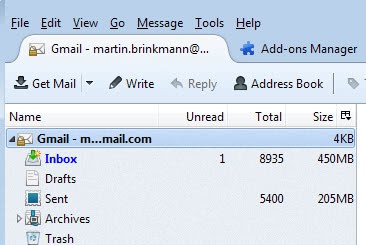
You can click on the configuration icon next to size in the header and disable the items that you do not want to display here.
Verdict
The Extra Folder Columns extension for Thunderbird adds a much needed feature to the email client. You can now not only see how large each individual folder is, but also how many emails it contains.





















it’s no longer accurate with version 60+
now you need to hit the hamburger menu, then options, then layout, then check folder pane columns
Thank you!
Use Extra folders extension https://addons.mozilla.org/en-US/thunderbird/addon/9716
Your suggestion seems to have disappeared with the latest version 3.0. Any new alternatives?
Thank you very much! This drove me nuts for a while…
This is awesome. All this time I never knew. It even works for saved search (showing your tags) folders! Thanks a lot.
Thanks for this tip!
work great. thanks.
I have an account in thunderbird that never shows in ‘all folders’. All other email accounts show fine. I checked settings and all match. Help!
Joe
btw, if you reinstall OS, can you just copy the Firefox and Thunderbird folders and paste them to the new OS in order to keep the mail and settings?
Thinking about moving to Linux, so want to keep my settings with me.
Thanks Martin, this was driving me crazy. I’d just installed Thunderbird again after a new OS install, and couldn’t remember how to do this for the life of me. Why does mozilla.org make this so obtuse? :(
Thanx a million ! :) You saved me !
thanks alot! it was exactly that i was trying to find. but i still have 1 problem unsolved – how to make Thunderbird to display number of messages in the whole account, but not only in the folders inside it?
Thanks a lot, this is what I was looking for.
Just what I was looking for, thanks!
Helpfull! cheers!