
Firefox Hide Menubar

Some users prefer to have as much space in the Firefox window as possible so that websites can make use of all the space without the browser interface getting in the way.
One way to get rid of some of the toolbars and menus temporarily is to press F11 which removes the title, the bookmarks toolbar and the menu bar.It launches Firefox's full screen mode that is useful if you just want to browse, or when you use it for presentations.
You can tap on the F11 key at any time to go back to the standard mode.
Another option that you have is to just remove the menu bar which is not needed most of the time anyway. To do that you simply need the Firefox extension called Hide Menubar which removes the menu bar once installed.
You can temporarily display the menu bar again by pressing the alt key on your keyboard. It is also possible to add it again by right-clicking the toolbars at the top and enabling the so called Mainmenu Toolbar. You can get rid of the bookmarks tab as well if you would like to but as far as I'm concerned they are pretty useful and I need them to often to hide them in Firefox.
Update: Mozilla has changed Firefox significantly in recent time. The menu bar is not displayed anymore by default. It has been replaced by a single button that opens the Firefox menu that you can use to select options or access often used features such as the bookmarks manager or add-ons manager.
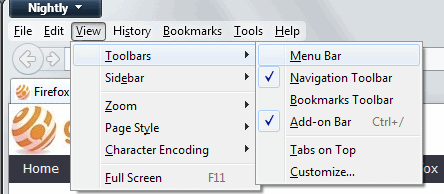
You can press the Alt-key natively at any time to display the menu bar temporarily on the screen. It is still possible to display it permanently, which removes the single button menu of Firefox instead from the browser instead.
The easiest way to make the change is to press the Alt-key, and select View > Toolbars > Menu Bar from the menu that opens up.
Advertisement


















this is the WORST option ever, what if you are a sysadmin and can no longer disable the hide menu bar option?
and don’t say that people should know enough to be able to bring the menu up again. They DON’T, and they always have problems with it
thankyou thankyou thankyou buddy ur gr8…:)
I installed Hide Menubar on my Ubuntu machine, but menu bar disappeared permanently, and ALT can not retrive it!
Thanks a lot for this idea!
Since the release of Google Chrome I’ve been looking for a way to re-consolidate user space in Firefox the same way as it’s done in G.Chrome.
Regards,
Dave