
How to reset the content advisor Password in Internet Explorer

I received an email from Heather describing a problem that she encountered. She enabled the content advisor option in Internet Explorer but lost the password that allowed her to configure or disable the content advisor again.
The so called supervisor password is defined when you first activate the content advisor. The funny thing is that the password is still set even if you uninstall and install Microsoft Internet Explorer again.
There is however an easy method to disable the content advisor password and it is a typical example of weak security.
If you can look it up on the Internet your kids can as well. All you need to do is delete two keys in the registry to remove the supervisor password and disable the Content Advisor in Internet Explorer
Now to disable the supervisor password go to the following registry key:
HKEY LOCAL MACHINE\SOFTWARE\MICROSOFT\Windows\Current Version\Policies\Ratings
Delete the entry "key" and "hint" and restart your computer afterwards. The content advisor is not protected by a password anymore and you can change all settings or disable it without providing a password.
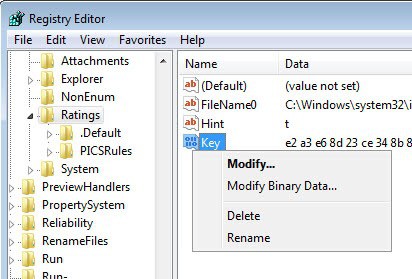
Update: The easiest way to get there is the following. Use the keyboard shortcut Windows-R to bring up the run box of the system. Enter regedit in the box and tap on the return key to load the Windows Registry Editor. You may see an UAC prompt that you need to accept before the editor appears on your screen.
All that is left to do now is to navigate to the structure using the sidebar folders. Once there, right-click each of the keys and select the delete option from the context menu. Just delete both keys and restart Internet Explorer to remove the password protection from the Content Advisor.
Update 2: If you do not like editing the Registry manually, you can try and run the Content Advisor Password Remover application instead to remove the password from the feature.
Additional information about the feature are available on Microsoft's Technet website.
Update 3: Please note that Content Advisor is not included in Internet Explorer 10 anymore.
Advertisement












Thanks. My computer is old and this might give me a few more months out of her. Worked great and was simple.
You only need to delete Key and Hint as shown above on the screenshot. Try this program instead it may work for you; http://www.nirsoft.net/utils/conadvpass.html
anyone who does not know how to get there already, should probably not be doing this, accidentally deleting the wrong key in the registry can put you into a world of hurt
my password hint will be white cat
I followed all of the steps and found the registry key but when I deleted it I got an error message saying that it could not be deleted
THANK YOU, THANK YOU, THANK YOU, THANK YOU.
Did i say thank you? OH, Thank you.
Thanks a lot man.. very useful information.
thanks i can finaly sort my otha com out
Hey…Thanks for your help…This issue of mine was resolved.By the resolution you provided.
Start/Run/Regedit then follow the path HKEY LOCAL MACHINE SOFTWARE MICROSOFT Windows Current Version Policies Ratings
thanks this helped me when an employee tried to lock me out of my own computer.
Open regedit and navigate through the structure until you reach the Ratings key.
i’ve got a message when i try to delete telling me that it’S impossible to delete all.
HKEY LOCAL MACHINE \ SOFTWARE \ MICROSOFT \ Windows \ Current Version \ Policies \ Ratings
what do you mean by registry keys?
do let me knw!
Upon doing some looking i found the software/microsoft/ windows but no current version folder or file was listed
Can you please go into a bit more detail in that. HKEY LOCAL MACHINE \ SOFTWARE \ MICROSOFT \ Windows \ Current Version \ Policies \ Ratings
Whats the HKEY LOCAL MACHINE and how does one get there??
The latest stable build is 2.03 and you can get a copy at the official site http://www.mozilla.org
Useful information in more compact form than other sources. Thanks a lot.
What is the latest but stable version of Firefox?
Where is the best site to get a copy?