
HiJack This review

HiJack This is a sophisticated security program for the Windows operating system that generates a report of various high profile locations of the Windows Registry and file system.
It displays all information that it has gathered in its interface and as a text log file afterwards. The core difference between other products of its kind is that the program lists all items that it finds in those location regardless of whether they are legit or not.
It is up to you to go through the list and decide whether an item is malicious in nature or not. It is not a tool for inexperienced users but is still used by many. Why? Because it is possible to post the information on forums and other websites to get opinions from other users about the files.
There is also a log file analysis tool that you can make use of. All you need to do is paste your log file into the form on the website, hit the analyze button and wait until the results are displayed on the screen. More about that later on in the review.
The scan itself does not take longer than a couple of seconds after which the results window is displayed to you on the screen. I suggest you go through the text file instead as it is more comfortable to read, or increase the default size of the results window instead so that you can read all lines displayed in it in full.
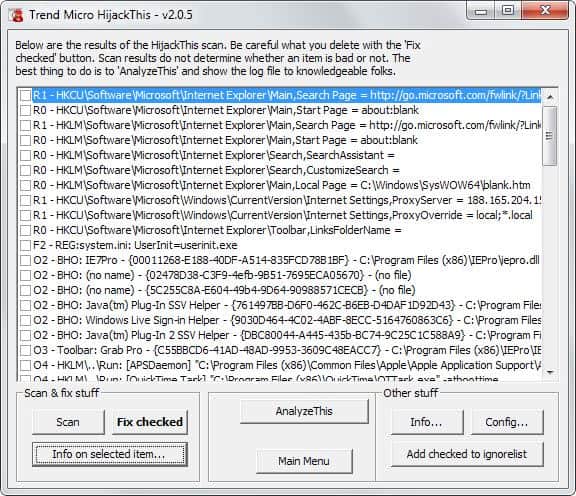
You can check one or multiple items and click on the fix checked button afterwards to repair or remove the item. Files do get removed usually while system settings, such as Internet Explorer's home page gets restored to its original value.
You can click on the "info on selected item" button after selecting an item listed by HiJack This to display additional information about its type. This may help you understand if an item is malicious or problematic or not.
Back to the log analyzer. As I said earlier it can be useful to get an automated second-opinion about the items discovered on your system.
It displays safety ratings for each item that it knows of. This helps you identify problematic items which you should take a closer look at. If you do not want to post in a support forum, you can alternatively try a search on the Internet to find out more about an entry.
Tips
- You can add items to the ignore list so that they are not displayed anymore by the program.
- The program creates a backup of modifications that you make. You can restore backups again in the settings under Backups.
- You can remove items from the ignore list in the settings as well.
- The tools section includes a host file manager, process manager and a tool that you can use to delete files on the next reboot.
Verdict
HiJack This is no replacement for up to date security software. What it can do however is provide you with an overview of modifications made to important locations on the system. This is useful if you want to make sure that nothing slipped by your security software for example.
It could use an update, for instance to include the home page information of other web browsers as well.
Advertisement















Martin
I’m thinking you are probably right and as McAfee will simply not allow me to download it, and it is a Corporate Lap Top, where I would need to request authorization and directions to disable it, and they frown on everyone downloading 3rd Party software anyway, I’m not going to lose any sleep over it.
I can always download the ZIP file, which begs the Question just WHY did they include the Optional ZIP file if they were not already aware that McAfee was testing out the EXE file as a false Positive?
I think so!!!!!!!
I think McAfee detects a false positive.
I doubt that there is a virus in the file. Do you have any prove for it ? I scanned it with latest AVG and several online scanners and they did not find anything.
W32/Generic.worm!p2p was attached to the V-2 Download exe File at the Trend Micro Site………..I recommend down loading the ZIP file and then take your chances as long as you have a very good Anti-Virus program Installed………………
Use this with Autoruns (from sysinternals), Process Explorer (sysinternals) to search for handles on dll’s, and Unlocker to unlock the handles, or to tell it to delete the file on next boot.
I have used hijack this many times over the years on friends computers. Another good solution aside from adaware and spybot is ccleaner (crap cleaner). I would recommend most novices try that first and see if the problems don’t go away.
It great that a new version of hijackthis is here.