
Add Remote Desktop Access to Windows Vista Home Editions

The Remote Desktop Connection feature of Windows Vista Business, Ultimate, and Enterprise editions enables easier remote access to any resource or application that your organization has made available to you. Microsoft made the decision to limit the feature to the editions mentioned above, which means that editions not mentioned in the list do not have it. This includes all Home editions of the Vista operating system which could be an issue for users who want to use the remote desktop feature on their systems as well.
The only option, other than upgrading to an edition of Vista supporting Remote Desktop Access, is to install and use third party products that add the functionality to Vista's Home Basic and Home Premium editions. One of the programs that you can use for that purpose is the excellent TightVNC. It takes up about two megabytes of disk space on your system and requires some basic configuration to work. The program is available for 32-bit and 64-bit versions of Windows, and supports all versions of the operating system from Windows 2000 to the very latest (Windows 8 at the time of updating the article).
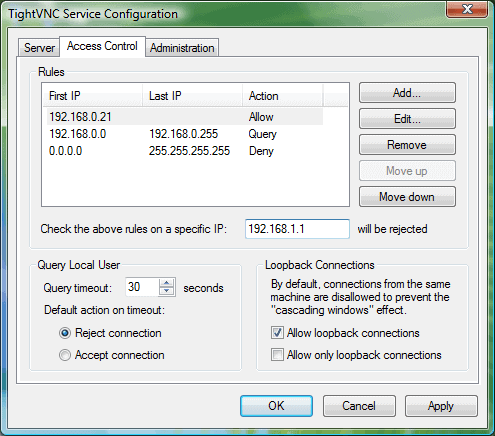
The current user properties can be edited during the installation of the program. You should supply a secure password, set a port or port range that should be used and edit the other options that are visible in the configuration menu. I would advise to remove the option to disable remote keyboard and pointer (view-mode only). Congratulations you have added remote desktop support to Windows Vista Home Basic and Premium.
The best way of getting started is to take a look at the documentation that is available on the project home page. It helps you to get started with the application so that you can get started right away. Other sections of the site, like the FAQ page may also be of interest.
Advertisement
















I can relate with a lot of the frustration in the comments above. But the remote access functionality has come a long way. I now use RHUB. It’s easy and secure.
I have never seen so many inept noobs all gathered together like this.
Put your PC’s in the garbage and just forget that the internet exists.
For the good of humanity please kill yourselves now.
The best program i have ever used is “TeamViewer”
Free for personel use, and accessible through firewall/router without any advanced settings.
Please beware that the use of the tip given at http://www.makeuseof.com/tag/remote-desktop-concurrent-sessions-for-windows-vista/ is at your own risk !
Microsoft has clarified at http://windows.microsoft.com/en-US/windows-vista/Connect-to-another-computer-using-Remote-Desktop-Connection that you cannot use Remote Desktop to connect to a PC running the following windows:
Windows Vista Starter, Windows Vista Home Basic, Windows Vista Home Basic N, or Windows Vista Home Premium or Windows XP Home Edition.
The message from Microsoft is very clear. Just don’t do it !
this hack doesn’t work. i can remote connect FROM my 32bit vista home premium TO my windows 7 ultimate, but I can not remote connect FROM my windows 7 ultimate machine to the windows home machine. I just keeps giving me errors. I tried the hack on the vista home machine and it just keeps saying it isn’t listening in the cmd and it keeps not working. this hack doesn’t work.
This is less than useless.
Thanks.
I like this software when it is set up for me, but the set-up is almost impenetrable for the layperson. That said, I know these are targeted at the more savvy users, but I think they are hurting their market with the difficult set-up process.
VNC is too slow.
RDP is the only solution really.
There are hacks to make vista do remote desktop but team viewer works for me. it has most of the fetures remote desktop has except sound but it dos have file transfer
Remote Desktop Access for a Windows Vista Home Premium Computer with a Dynamic IP address utilizing a Linksys Wireless Router. This is not an easy process so I recommend printing this. I took me about 7 hrs from researching and messing around with settings to get this to work. I hope this works for you first time.
This will give you an in-depth walk-through on making your remote desktop work. My story, I bought a Palm Treo 850 WM6 and found that after extensive reading that my Vista Home Premium was not compatible. Then to top it all off, I needed a static IP to make it work. Both are false. Here is how I made it all work.
1. Download a patch for Windows Vista Home Premium. Google search Windows Vista Premium Remote Desktop. I believe the provider of my batch file was greenlight? You can find it on http://portal.tonychan.org/Default.aspx?tabid=58&EntryID=123
When you save this file, browse for c: then select Windows, then “tempâ€, then save. Make sure to save this file in the temp file.
Go to files on your computer ie. My computer
Select C:
Select Windows
Select System 32
Scroll and find termsrv.dll (this is the file that will be modified)
Just click at the end of the “V†and add the word “backup†this way if something installs incorrectly then you still have the original batch file and you can just delete the new one.
Right click on the start ribbon on your desktop screen. Select classic (this makes things easier).
You now have RUN listed on your start menu.
Open Run and in the box type c:\windows\temp\premium.bat “Hit Enterâ€
This will extract all the files necessary over to “windows\System 32†for you.
If you are having administrator issues, click in the “Run†CMD line and type msconfig
This will bring up a booting options menu. From there you can select reboot in safe mode. Note you will need to do this again and turn off Boot in safe mode when you are done with the installation otherwise you will only boot in safe mode. Once the computer reboots try extracting again. You will want to right down c:\windows\temp\premium.bat
Should have everything installed now right?
(One other thing I had to do was called takeown f\windows\system 32\termsrv.dll) I think that is the correct syntax… If not Google it and find out how to do a takeown. If you are logged in as administrator there shouldn’t be any additional info needed. Make sure to research this if you are having issues. You do not want someone else controlling your remote access.
2. You will need to go to your control panel, select your windows firewall, and change the properties, or options to allow remote desktop & enable port 3389. DO NOT TURN OFF FIREWALL. It can create problems if it is turned off (read below).
3. You will also need to go into the control panel , select system, remote settings, enable connections for Remote desktop.
4. Next the router. I have a Linksys WRT54G? I think that’s right. You want to go to the router 192.168.1.1 this is the address to type in the address bar of your internet explorer. You will need to log into your router. Default Linksys user is left blank and the password is “adminâ€.
5. Once you are into the router, you will select applications and gaming. You will notice port forwarding appears. In the “application box†type Remote and in start and end box type “3389â€
6. Now for the IP address make it 192.168.1.248 (this high number keeps other computers from getting assigned it as we are going to setup one computer to connect as a static behind the router connection.
7. In the router screen select “Setupâ€. Scroll down to Static DNS:1 and input that address we used in port forwarding 192.168.1.248 You should be ready to click save in the router screen. Before you exit, click “Status†and write down your Router IP and Subnet Mask and DNS1 DN3 DNS3. You can exit the router now. Make sure you have saved.
8. Time to setup your computer to read this connection. So right click the computer screen with the globe in front of it on the bottom right of your screen. Select Network and Sharing Center. This should open a screen, select manage network connections on the right. This will bring up the connection to the router as “wireless network connection†just right click and select properties. Now select TCP/IPv4 in the list. Now change the automatically find to input this IP and enter that static IP you created 192.168.1.248 and the DNS and submask that you recorded from the Status screen. DO NOT USE the 192.168.1.248 as one of the subnet mask. Use the other two of the three or if you only have two then use them but they should be different that your created static IP.
One thing to keep in my is that your connection will be the IP of the router. So if you are trying to remote desktop connect to your network, use the IP from the status screen of the router. You may occasionally have to check to see if your IP address has been changed since service providers can change them if you are not signed up for a static IP address. This can cause connection issues. Just type the new IP in the remote desktop computer you are connecting FROM.
If you are having connection problems, try rebooting in save mode again and re-run the file c:\windows\temp\premium.bat after everything is setup. You may need to perform the take own again. You can also check to see if the port is listing by typing in the RUN or CMD line netstat -aon
See if 3389 says listening. If not, then you have not configured the router correctly or the firewall etc.
At first I was having problems with the network “bouncing from private to Identifying†apparently just turning the Windows default settings firewall back on and making an exception for port 3389 will fix this.
If you are using Windows Mobile 6.1 with Remote desktop you may find the audio from your PC will not play on your Windows Mobile Phone. Not sure why this is but if you find a fix let me know. I have adjusted the settings in the options and this didn’t help.
Hope this helps and people get this to work first try. If it works for you then email me at directlyconnected@yahoo.com I don’t have time to answer individual questions. I got there by googling everything so you can find more extensive answers out there on specific questions or call an IT buddy. There are a lot of great forums out there that handle individual problems that people figured out so this will give you about 90% of it. Again, you may want to research if you are still having issues.
why hasn’t anyone ever looked into TeamViewer? It’s a remote desktop software. install it and run on both computers, and you then can control other computer…
Has anyone tried disableing UAC on Vista to see if it fixes the ‘disconnect on a UAC prompt’ issue?
I haven’t tried it, but if the issue is just UAC pausing the computer and waiting for the user to click ‘allow’, then I don’t see why that wouldn’t work.
http://www.unet.fi/fransblog/2007/08/30/enable-remote-desktop-connection-on-vista-home-premium/
Go there for Remote Desktop and not VNC!
I went on my XP machine and controlled my Vista Premium Machine. I have used VNC, but it’s slow. RDC is much faster and the colors are more vibrant!
Only problem is the “Terminal Services Client†(Remote Desktop Viewer) on my PDA doesn’t connect :(
I had the problem with Remote Desktop. After installing termsrv.zip on Vista Premium the Terminal Service was up but the port was not Listening.
I found out that there was a termsrv_sp1.zip
for Vista SP1. I installed it and it fixed my issue. Make sure you have the latest DLL from the zip file.
Why with all the downloads and updates we get can’t we request to have sent to our computers especially as we are wanting computer remote a lot of the time to help a relatively new user of computers how to do things etc, just to be able to show learns the basics really. Robyn
TeamViewer is great and I am using to create a VPN between two computers, but I want Remote Desktop for its ability to keep the machine locked and still be able to use the desktop. Then no one is messing with the mouse and keyboard while I am working.
Anyone found a hack to get it on Home Editions of Vista yet? I’d rather not have to go through the upgrade process to get one of the business editions on my machine.
Just trying to provide remote support for family. Teamviewer is awesome.
Oops, Teamviewer does do OSX too.
Any of you ever heard of Teamviewer?
I’ve used most remote control products over the last 15 years. This one rocks for managing remote systems. Performance depends on bandwidth, central server for internet, VPN for added security, local LAN for privacy; yay!
Sure there are a few annoyances, like the nag screen and it only runs on windows (but XP and Vista and some earlier), but, its the easiest to setup, can run as a service with a fixed password, or not. Small (1 MB) client module for quick, new client, support. Connections can change mid-stream, file transfer and remote presentation (one-way sessions).
It is a different license model; license is purchased once; period. Free RSS updates, no maintenance (read support, who needs it anyway).
Really, what do you want, free for non-commercial use; max, only $1400 for life otherwise?
If you’ve got feedback to the contrary, please share it; maybe I’m living in a cloud.
Thanks,
wyz
mircea,
U’ll need to open the ports on firewall. If u r using a router ull need to fw the connection to ur machine.
Maybe can help u: http://www.unet.fi/fransblog/2007/08/30/enable-remote-desktop-connection-on-vista-home-premium/#comment-42199
hy
I have instaled termsrv.zip,,the servicess are running the port is listening but is stiil not working the remote connection.I forgot to tell you i have vista home premium.Someone can help me?
Post sp1/no dll hacks etc.
I was frustrated too that I could not remote from my laptop with vista premiun to my desktop with ultimate. I could remote the other way of course.
Last night I forwarded udp and tcp ports 3389 on my router using the desktops address and was able to remote to my desktop from my laptop using the free rdc download from microsoft.
Hope this helps someone else.
Victory! Simply download termsrv.zip, extract it somewhere on your Microsoft Windows Vista Home Premium computer and run premium.bat.
I’ve not tried this myself, but I’m about to. I know this kind of hack enabled me to use Remote Desktop Connection on Microsoft Windows XP with multiple users simultaneously.
Now someone hacked the termserv.dll to enable Remote Desktop Connection in Microsoft Windows Vista Home Premium.
Obviously, Remote Desktop does not work on Vista Home versions. Use RealVNC instead. The Vista version of RealVNC is not free, but it works perfectly well.
So forget about “Remote Desktop” or upgrade to Vista Bidness.
This worked for me:
Connect on the LAN:
From: XP laptop
To: Vista Premium Desktop
With: UltraVNC 1.0.2
Just don’t run the UltraVNC server as a service. An alternative is to put it in the windows startup section. You may have to tell Windows Defender to allow VNC server to run. Either do it on the notification screen, or via the control panel (Windows Defender -> Tools -> Software Explorer). And of course, firewall and router settings must allow connectivity.
My laptop has a normal display, and my desktop is widescreen with aero and it will be displayed on the laptop – albeit with edge scrolling.
Hope this helps.
I guess the real answer is: Microsoft figured anyone stupid enough to buy a PC with a bundled operating system is too stupid to actually be able to use it. I am pretty happy with my new HP Laptop but the OS (Vista Home Premium) precludes me from doing any real work. Like remote desktop to my work pc and send emails so the bosses think I am at work when instead I am at the beach or home playing video games. It truly is my fault for buying a pc with Windows preinstalled.
here is a patch available to fix this problem Download:
http://www.bjoern81.kicks-ass.org/include.php?path=article&contentid=49
Here is a how-to for Vista Home Premium und the free UltraVNC, its great and quick:
http://www.we-u.com/?p=103
I could not get vnc Server to work.
I agree with the above and moste importantly
IT’S S.L.O.W ….
How do I install Remote Desktop Connection?
You don’t need to install it. Client version of Windows, Remote Desktop Connection is installed by default in all – home or ultimate. Server is what is missing.
•
Open Remote Desktop Connection by clicking the Start button Picture of the Start button, clicking All Programs, clicking Accessories, and then clicking Remote Desktop Connection.
NoteYou can also open Remote Desktop Connection by typing “mstsc” in the Search box on the Start menu.
As far as I know VNC is a remote desktop, but it is not the same RDP with one Microsoft RDP. VNC cannot connect to Microsoft RDP as the system port is totally different. correct me if I’m wrong.
Has anyone got around the UAC problem when running any vnc server as an application not a service (called user mode in some of the vnc flavours)??
Anyone??
yep, misleading post. This has nothing to do with remote desktop.
Yes, for RealVNC (and probably TightVNC) to work then you need to add “C:\Program Files\RealVNC\VNC4\winvnc4.exe” to your Windows Firewall exceptions list (or any other firewall program you have). Also, stop/unregister VNC Service (you’ll find shortcuts to use). Then start (or add to Startup menu) the User-Mode VNC Server. You can also add a password to the VNC Server.
Now what’s all this about UAC? How can we get around this UAC business?
Do you have a compiled/build of your modification yoshiki?
Please put it up on the web.
As temporary end run, I commented out one part of source (in SDisplay.cxx) of vnc4.1.2.
in function isRestartRequired()
// – Check that we are in the input desktop
// if (rfb::win32::desktopChangeRequired())
// return true;
Even if UAC dialog appears, a client is not cut off.
Tight VNC don’t work on VISTA. RealVNC either. Both give you only black screens or problems. And VNC is not remote desktop.
Home premium and home basic only have remote assistance.
This is a totally useless tip! VNC is NOT remote desktop.
BTW Tight VNC does NOT WORK on Vista.
Ok, so I have ultraVNC, same thing really. Very very easy to set up.
It works but only if
A: There is no password screen– I must be logged in as a user and ready to go and
B: I dont try to do anything that requires security.
Whenever I try to use a website that say would open a program windows wants to ask if its alright and POOF, bye bye VNC untill I get to work the next day.
Vista is freaking overkill in some cases.
this tip es stupido
PcHelpWare is not Remote Desktop either. I can’t find anyway to add Remote Desktop to Vista other than upgrading to Vista Business.
You should NOT install TightVNC as a service, as it will give you a black screen. Still, do not forget to configure the Windows firewall (if you’re using it) to allow port 5900 TCP incomming. Also, Windows Defender classifies TightVNC as possibly unwanted.
All in all not a really workable alternative to real Remote Desktop, sessions are slow and the screen get doesn’t get updated automaticly in my situation.
TightVNC still requires a TightVNC server to be running on the machine that you want to remote to right? So how is this a substitute for remote desktop?
Correct me if I am wrong.
PcHelpWare is your solution, search for it :)
The problem with Tight VNC is that any UAC prompts close your VNC session so its only good for as long as nothing requiring admin permissions is attempted during the session, or if UAC is turned off.
but vnc is not remote desktop….
Exactly, this article should be removed so nobody else searching for an rdp solution on Vista Home editions ends up wasting their time here.